

AI agent audit trail: generate a NIST AI RMF report
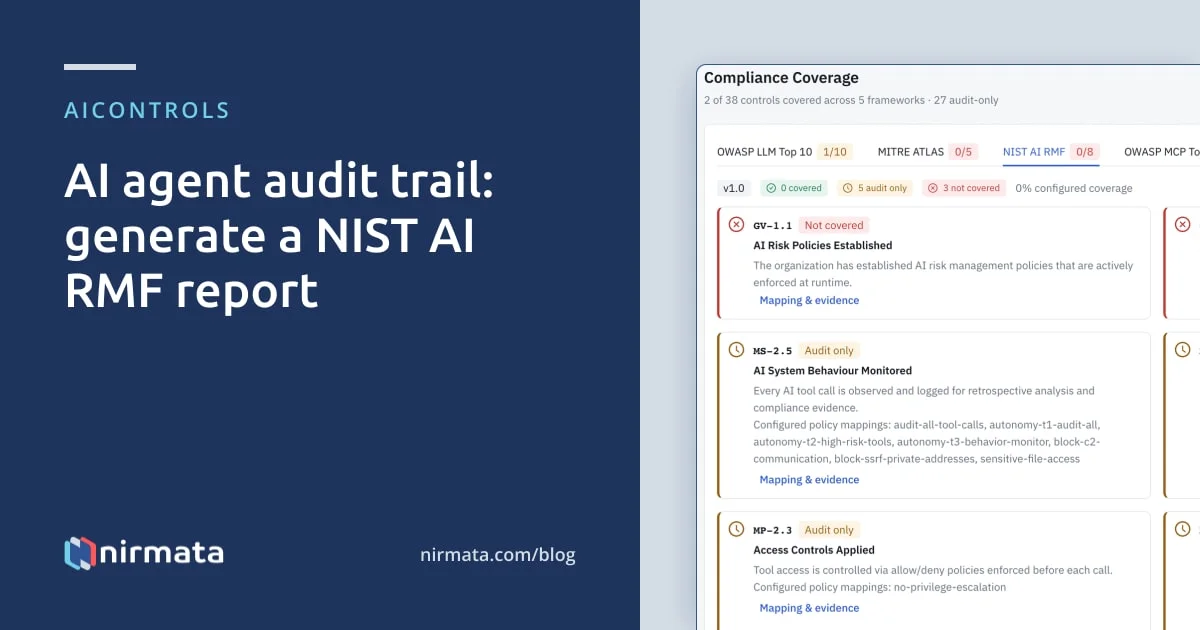
AIControls builds the AI agent audit trail at its gateway. Each LLM request and MCP tool call is logged with the identity, the tool or model, the governance decision and the policy behind it. The Security → Compliance page maps your enabled policies to eight NIST AI RMF controls, and Export Report downloads that coverage as JSON for an auditor.
Checked against the AIControls documentation at docs.aicontrols.dev as of 2026-11-21.
Why do auditors ask for an AI agent audit trail?
An auditor reviewing AI risk wants two things you can hand over: what the rules are, and a record of what agents did under them. Agent activity is spread across coding tools, MCP servers and model providers, each with its own logs. Earlier posts cover the per-tool route: auditing MCP tool calls and auditing what your AI coding agent did with Claude Code telemetry, and auditing AI agent actions in Kubernetes through the API server audit log.
This post is about the gateway route. AIControls sits between agents and the models and tools they call, so one log holds every request it handles, whichever client sent it. It then lines your policies up against the NIST AI RMF, the voluntary framework NIST released on January 26, 2023. The framework’s core has four functions: Govern, Map, Measure and Manage. Govern is described as cross-cutting, running through the other three.
What does AIControls record for each agent request?
MCP tool calls and LLM requests are stored in the same audit log. Every event carries:
- the UTC timestamp, and the identity: a developer email or agent ID, plus team membership at the time of the request
- the request type (MCP tool call, LLM request or Cross-App Access token event), the tool name or model, and for tool calls the MCP server it targeted
- the decision, such as Allow, Mutated, Deny, Audit, Warn or Warn Ask, and the policy rule that produced it
- the resource touched, such as a file path, repository or namespace, and token count and estimated cost for LLM requests
- for agents in Kubernetes, the pod name and UID, node and service account UID, read from the projected service account token rather than the source address
A held call waits in Security → Approvals. When a reviewer decides, the decision is written as its own row (hitl_approved or hitl_denied), and the original request’s row records the final Allow, Mutated or Deny. That gives an auditor the human decision and the request it governed as two separate records.
Tool calls an agent reported itself, rather than ones the gateway evaluated, are tagged Observed. Keep that distinction in the evidence: an Observed row shows activity, not enforcement.
Who changed the policies, and when?
An auditor will ask whether the rules in place during the review period are the rules you show them. AIControls keeps a separate configuration audit trail for that. It records the actor, the affected resource and the changed fields, with before and after values where they are safe to show.
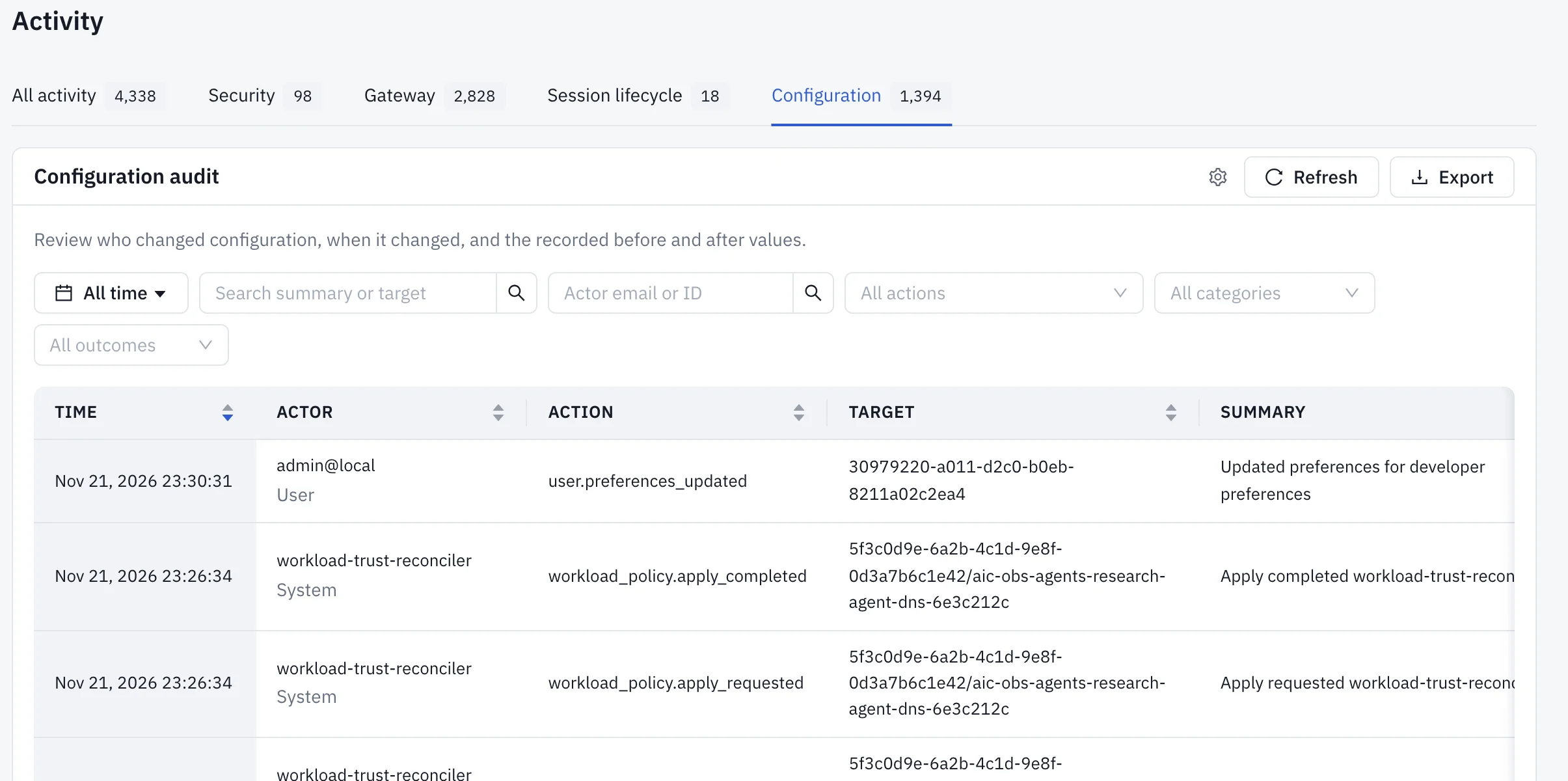
The recorded operations include policy creation, editing, cloning, enable and disable, enforcement-mode changes and deletion. They also cover policy exceptions, team creation with SSO group bindings, provider and route updates, and user and access-token changes. Credential values appear as [REDACTED].
For audited configuration writes, the change and its evidence commit together: if the audit record cannot be stored, the configuration change is rolled back. A policy cannot quietly change without leaving a row behind.
Open it on Security → Activity → Configuration. The All activity tab on the same page puts configuration changes, security events and gateway calls on one timeline, so you can see what traffic followed a policy edit.
How does AIControls map policies to NIST AI RMF?
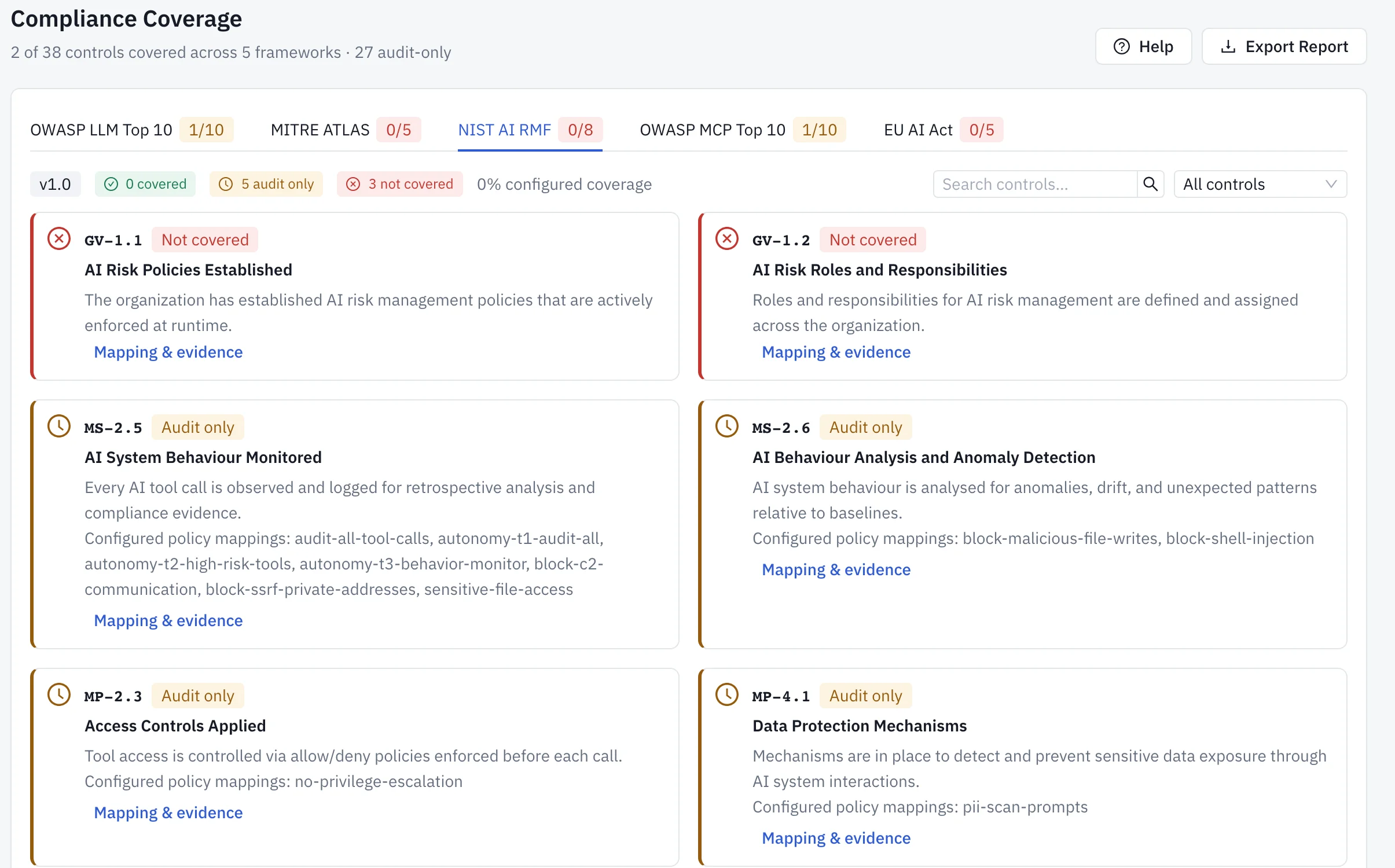
The Compliance page reports five frameworks at once: OWASP LLM Top 10, OWASP MCP Top 10, MITRE ATLAS, NIST AI RMF 1.0 and the EU AI Act, 38 controls in total. NIST AI RMF has eight of them, identified by the function prefixes GV, MP, MS and MG.
Nothing is inferred from the features you switch on. A control counts only when an enabled policy names it in an annotation:
metadata:
  annotations:
    proxy.nirmata.io/frameworks: "owasp:LLM07,nist:GV-1.2,eu-ai-act:Art.14"
The shipped policy packs already carry these annotations. A policy you wrote yourself counts once you annotate it. Coverage recomputes as soon as a policy loads, is disabled or is re-annotated.
Each control then gets one of three states. Covered means an enabled policy naming it runs in Enforce, Approval, RequireApproval or WarnApprove mode. Audit only means a policy names it but in another mode. Not covered means no enabled policy names it.
The docs are direct about the limit here: coverage reports configuration, not operating effectiveness. A Covered label does not prove a request was ever blocked. That proof lives in the audit log.
Which NIST AI RMF controls can AIControls evidence?
The first three columns below come from the AIControls compliance controls reference. The last column is our pairing: the records in the audit trail an auditor can sample to see a control operating. The exported report itself lists only the policies mapped to each control.
| NIST function | AIControls control | What it covers | Records to pair with it |
|---|---|---|---|
| Govern | GV-1.1 AI Risk Policies Established |
AI risk policies are enforced at runtime | Configuration audit rows for policy creation, edits and enforcement-mode changes |
| Govern | GV-1.2 AI Risk Roles and Responsibilities |
Roles for AI risk management are defined and assigned | Configuration audit rows for team creation, SSO group bindings and user changes |
| Map | MP-2.3 Access Controls Applied |
Tool access is controlled by allow and deny policies before each call | Gateway rows with a Deny decision and the policy that produced it |
| Map | MP-4.1 Data Protection Mechanisms |
Sensitive data exposure through AI interactions is detected and prevented | Gateway rows where a content safety policy denied or mutated the request |
| Measure | MS-2.5 AI System Behaviour Monitored |
Every AI tool call is observed and logged | The Gateway audit log export for the review period |
| Measure | MS-2.6 AI Behaviour Analysis and Anomaly Detection |
Behaviour is analysed for anomalies against baselines | Baseline findings in Security → Activity → Correlated findings |
| Manage | MG-3.1 Human Oversight Mechanisms |
High-risk actions can be escalated to human approvers | hitl_approved and hitl_denied rows, and the request rows they resolved |
| Manage | MG-4.2 Incident Response |
Denials and escalations notify external systems | Incident exports to a SIEM as OCSF Detection Findings |
These are AIControls identifiers built on NIST’s function names. They are not the subcategory text of the NIST AI RMF itself, so quote them to an auditor as the product’s control list.
How to generate a NIST AI RMF report in AIControls
- Install the shipped policy packs, which carry framework annotations, so their controls leave Not covered without extra work.
- Add
nist:<control>to theproxy.nirmata.io/frameworksannotation on each policy you wrote that addresses a NIST control. Remember the rule of one control per framework per policy. - Check each mapped policy’s mode. Approval modes are appropriate for
MG-3.1; you don’t need Enforce to get the Covered label. - Open Security → Compliance and select the NIST AI RMF tab. Filter to Not covered to see the gaps, and select Mapping & evidence on a control to read its mapping source and limitations.
- Select Export Report. The browser downloads
compliance-report-<date>.jsonwith the generation time and, for each framework, its version, a covered-of-total count, and each control’s ID, name, status and the policies covering it. - Open Security → Activity → Gateway, set the review period, and export the audit events to CSV. Check the export menu for filters it leaves out before you hand the file over.
- Open Security → Activity → Configuration, set the same period, and choose Export → Export CSV or Export JSON for the policy change history.
The report from step 5 answers “which rules map to which controls”. Steps 6 and 7 answer “what happened, and who changed what”. An auditor needs both.
What the report does not prove
Read the report as evidence for review, not a certification. Four limits matter.
The export states that its basis is current configuration and that runtime evidence is not included. Its timestamp is the export time, and the mappings reflect what was loaded then, so it is not a historical record of past quarters. Export it at each review and keep the files.
A covered control covers the part a gateway can see. Some NIST and EU AI Act controls concern training data, model development or organizational process. AIControls treats a not-covered control as “no evidence here”, not as “unmet”.
The audit trail covers traffic through AIControls. Agents that call a provider with their own keys are not in it.
Exports have ceilings. Configuration audit exports stop at 10,000 events and mark a partial file with truncated in JSON or exportTruncated in CSV. Narrow the time range until the file is complete.
The docs list the report as supporting context for internal reviews, vendor questionnaires, SOC 2 or ISO 27001 supplementary evidence, and submissions where NIST AI RMF or EU AI Act alignment is requested.
How long does AIControls keep the evidence?
Audit events are kept for 90 days by default and then purged. With plan-based enforcement, the plan’s raw retention can shorten that: 30 days on Team and 365 days on Business, with Enterprise set by contract. To keep events longer, configure an S3-compatible object store under Settings → Integrations. Events stream there in real time and are retained indefinitely.
Configuration audit history has its own setting at Settings → Data → Configuration audit. The default is 365 days, and 0 keeps it forever. Purges are recorded too.
Incident triage history, meaning who assigned, acknowledged and resolved each security incident, is kept indefinitely by default because the docs treat it as a compliance record.
Match retention to the audit window before the audit starts. A review period longer than your retention leaves a gap no export can fill, and content removed by retention cannot be recovered.
What about the EU AI Act and Kubernetes workloads?
The same Compliance page has an EU AI Act tab with five articles: Art. 9, 10, 13, 14 and 15. The annotation prefix is eu-ai-act, so one policy can name a NIST control and an EU AI Act article together. The docs note that these articles reach beyond what a proxy observes, so a covered article is evidence for one aspect of it.
Self-hosted Kubernetes installs add a per-workload export. Under Inventory → Workloads, open a workload, then Open full details → Posture → Export evidence. The JSON file holds the governance scorecard, Pod Security level, RBAC privilege and Kyverno results, mapped to EU AI Act articles and the OWASP Top 10 for Agentic Applications. It does not map to NIST AI RMF. Its disclaimer field says it is evidence for review, not a certification. For the cluster side of an audit, see collecting Kubernetes compliance evidence for auditors.
Workload compliance evidence and incident export need the Advanced Security add-on, which is included in Enterprise and sold separately on Business.
Build the trail on your own agents
For the wider approach to AI agent governance, start with governing AI agents. The AIControls platform page covers the gateway, policies and audit log in one place. To produce a NIST AI RMF report from your own agent traffic, download AIControls or request a demo.
Frequently asked questions
Can one AIControls policy count toward two NIST AI RMF controls?
No. The proxy.nirmata.io/frameworks annotation is read as one control per framework, so a value that lists nist:GV-1.2 and nist:MG-3.1 keeps only the last entry. To cover two NIST controls, annotate two policies. The same policy can still name one control in each of the other frameworks, such as an OWASP LLM risk and an EU AI Act article.
Does AIControls map Kyverno policies to NIST AI RMF?
No. The framework mapping covers AIControls policies only. Kubernetes posture groups Kyverno results by policy category and has no configurable mapping to compliance standards. The one exception is the workload compliance evidence export on self-hosted Kubernetes, which cites each Kyverno policy category as evidence for EU AI Act Art. 9 and Art. 15. Kyverno itself is a CNCF graduated project.
Are agent prompts stored in the AIControls audit trail?
A snippet of the last user turn is stored for each LLM request, capped at 5,000 characters by default under Settings, General, Data Retention and Session Limits. Setting the cap to 0 records the request without its text. Credentials are always redacted before the record is written, and personal data such as email addresses and card numbers is redacted by default.
Does the audit trail include agents that call a model provider directly?
No. The audit log records requests that pass through AIControls, plus events agents report over OpenTelemetry, which appear with an Observed decision because the gateway did not enforce them. An agent using its own provider key outside the gateway leaves no record. Route agents through the gateway before you present the trail to an auditor as complete.