

Least-privilege MCP: filter AI agent tools by identity
AIControls gives AI agents least-privilege MCP tool access by sitting between agents and MCP servers as a proxy. Access Bindings grant each team, IdP group, user or agent a named set of tools. A default-deny posture refuses every tool nobody granted, and CEL policies evaluate every tool call against its name, its arguments and the caller’s identity.
Checked against the AIControls docs for MCP governance, team access, Toolsets and policy context as of 2026-11-21.
What does least-privilege MCP access mean for an AI agent?
Most MCP controls in AI coding tools work at the server level. Claude Code’s managed settings decide which MCP servers Claude Code can use, and Cursor’s team dashboard can allowlist MCP servers by command or URL. Once a server is allowed, every tool on it is in reach.
Least privilege goes one level down. A GitHub MCP server might expose get_issue, list_pull_requests and delete_repository. An analytics team needs the first two. Almost nobody needs the third from an agent. Least-privilege access means each identity gets the tools its work needs and nothing else, and the decision is enforced outside the agent, where a prompt cannot argue with it.
Our post on tool-level authorization for AI agents covers how the MCP spec splits that job and how Claude Code evaluates its own rules. This post covers the intermediary: how AIControls makes the decision for each identity across every MCP server you connect through it.
How does AIControls decide which tools an identity can use?
MCP clients connect to the AIControls proxy instead of to each upstream server. The proxy intercepts each tool call at the protocol layer, evaluates policy against the tool name and arguments, and then allows, denies or holds the call for approval. The upstream server needs no changes.
Identity comes from the caller. A developer is identified by the email in their OIDC token or by a personal access token and is grouped by team. An agent is identified by a SPIFFE SVID, a Kubernetes service account, a named PAT or, for Microsoft Entra agents, its Entra application ID. Users sign in through Google Workspace, Microsoft Entra ID, Okta or any OpenID Connect provider.
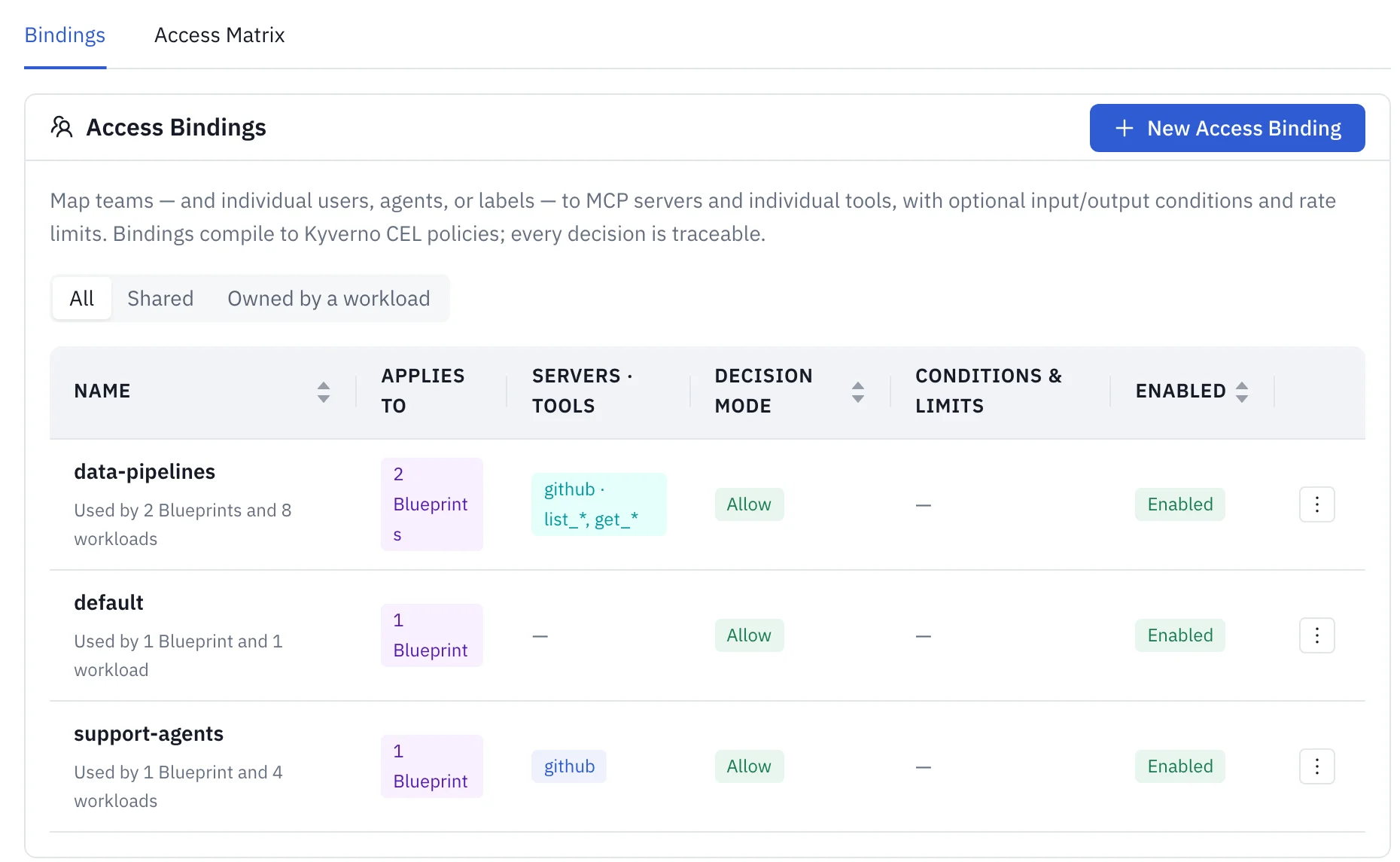
An Access Binding maps that identity to tools. Its Subjects can be a team, group, user (email), agent (an ID, with a trailing * glob allowed) or agentLabel. Its tool selectors name servers and tools, using exact names or simple globs such as read_*. A caller gets the union of every binding that applies to it.
Filter, deny or hold: what each control prevents
AIControls checks access at more than one point. The table lists the controls the docs describe for MCP tool access, where each one acts and what it stops.
| Control | Where it acts | What it prevents |
|---|---|---|
| Binding check at token issuance | When a developer’s tool requests a Cross-App Access token for a server | A team with no covering binding, a failed condition or an over-broad scope gets invalid_grant, so it never holds a token for that server |
| Server gate | Every call to a bound server | Callers that match no binding for the server are denied (mcpaccessbinding-gate:<server>) |
| Unlisted-tool posture set to deny | Every call on that server | Any tool no enabled binding grants to this caller is denied (mcptooldefault:<server>) |
| Deny-mode binding | Calls to the selected tools | Its subjects cannot call those tools, even if another binding grants them |
| Input conditions | The request, before the tool runs | Calls whose arguments fail a CEL check, such as a path outside /workspace/ |
| Hold decision mode | Calls to the selected tools | Calls run only after a person approves them in the Approvals queue |
| Drift response mode set to Block | The tools/list response |
Tools whose definition changed, or that appeared after pinning, are hidden so clients cannot see or call them until an admin re-pins them |
When several rules apply to one call, the most restrictive outcome wins. A binding in Audit or Warn mode restricts nothing: the call goes through and only the logging or the message changes.
Group tools into Toolsets
Writing the same tool list into five bindings means five lists that drift apart. A Toolset is a named set of tools, drawn from one or more servers, that bindings reference by name. Editing the Toolset updates every binding that uses it.
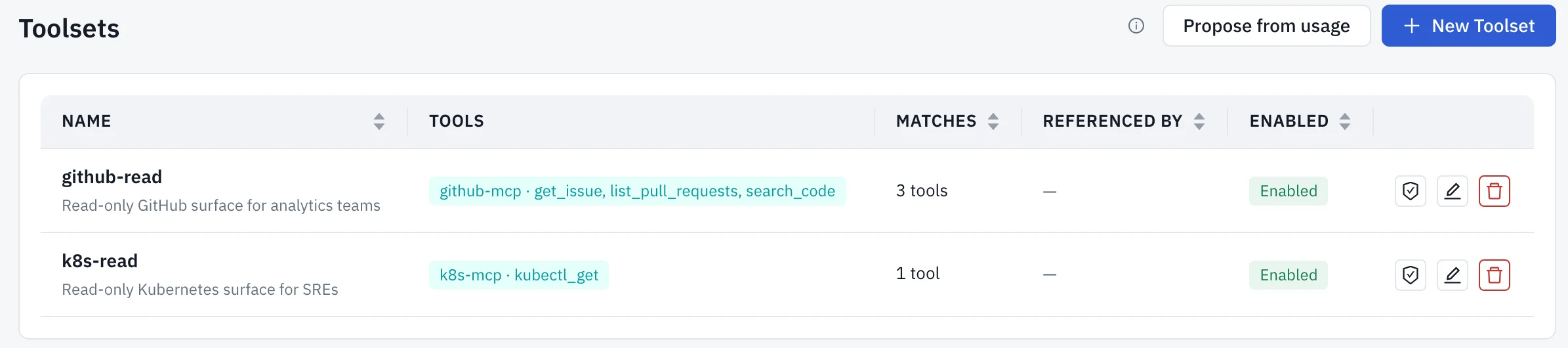
kind: MCPToolset
metadata:
  name: github-read
spec:
  description: "Read-only GitHub surface for analytics teams"
  selectors:
    - servers: ["github-mcp"]
      tools: ["get_issue", "list_pull_requests"]
    - servers: ["*"]
      tools: ["read_*"]
A Toolset is data, not a separate engine. When a binding references one, its selectors are inlined into the same mcpaccessbinding:<binding>:tools policy that inline selectors produce. Three details from the docs matter for least privilege:
- A deny-mode binding can reference a Toolset, for example a
destructive-opsset, to block the whole surface for its subjects. - If a referenced Toolset is deleted or disabled, it contributes nothing. A binding never falls back to all tools.
- AIControls refuses to delete or rename a Toolset that any binding still references, enabled or disabled, so a delete cannot shrink a grant without anyone noticing.
How to set up least-privilege tool access
These steps follow the AIControls task pages for connecting a server, managing Toolsets and controlling tool access. Stage everything in Audit before you enforce it.
- Register the server under Inventory → MCP Servers → Registration tab → Add MCP Server. Set its Data Classification, since that drives which of its tools are flagged Elevated Privileged.
- Open the server’s Tools tab and review what it declares. Each tool shows an access type (read, write, delete, execute or unknown), its call count and who is granted it. Fix any misclassified tool with Set access type override.
- Go to Inventory → Toolsets and select Propose from usage. Pick an agent or team and select Create draft. Review the explicit server and tool selectors, then select Create. Closing the drawer saves nothing.
- Go to Setup → Settings → Access Bindings → New Access Binding. Name it (names can’t change later), add subjects under Applies to and choose Selected tools under MCP tools. Attach the Toolset in the binding’s Toolsets field.
- Under Advanced, set Decision mode to
Auditand save. Watch Security Events for a few days. Each call to a bound server records thebinding_namethat governed it. - Switch the binding to
Allow. For sensitive tools, create a second binding inHoldso a person approves each call.
Turn on default-deny and verify it
Bindings alone leave unnamed tools reachable, because each server’s tool default action starts at allow. Default-deny closes that gap: only tools that an enabled binding grants to the caller stay reachable. Before you switch, check the tool inventory for tools in active use that no binding grants. Those calls fail as soon as the posture applies.
In the UI, open Inventory → MCP Servers → Details → Access and set Unlisted tools on this server to Deny. Or use the API:
curl -X PATCH "$YOUR_WORKSPACE_URL/api/v1/mcp-servers/github-mcp/tool-default" \
  -H "Authorization: Bearer $ADMIN_TOKEN" \
  -H "Content-Type: application/json" \
  -d '{"action": "deny"}'
The change applies on the next policy refresh, with no restart. To verify, open Setup → Settings → Access Bindings → Access Matrix, pick one identity and read its effective allow or deny for every server and tool, with the binding or posture that decided each one. Then call a tool outside the grant as that identity. It should fail with “tool not granted by any access binding”, from policy mcptooldefault:<server>.
Layer bindings across teams
The manage-access-by-team page recommends grouping grants by who needs them, not by team. Create one baseline binding for everyone, using a group that every user’s IdP token carries, with search and docs tools. Then add one binding per shared need and list every team that shares it as a subject. A crm-readonly binding can name both Marketing and Support. Because a caller gets the union of its bindings, a Marketing member gets the baseline, the marketing tools and CRM read access, while a Support member gets only the baseline and CRM read access.
To give one more team a shared grant, add the team to that binding. Copying the grant into a new binding creates two lists to keep in sync. Before you confirm an edit, Preview impact shows who gains or loses access, and each revision is kept in the binding’s history so you can restore an earlier one.
Write a CEL policy for rules a binding can’t express
Bindings cover who may use which tool. For rules that depend on the kind of tool or on IdP attributes, write a policy. AIControls policies are Kyverno CEL documents (Kyverno is a CNCF-graduated project), and the tool access type is available to them as object.mcp.accessType. This policy limits every delete-type MCP tool, on any server, to members of one IdP group:
apiVersion: policies.kyverno.io/v1
kind: ValidatingPolicy
metadata:
  name: delete-tools-platform-admins-only
spec:
  matchConditions:
    - expression: 'object.mcp.tool != ""'
    - expression: 'object.mcp.accessType == "delete"'
  validations:
    - expression: 'object.user.isPresent && "platform-admins" in object.user.groups'
      message: "Delete-type MCP tools are limited to the platform-admins group"
  validationActions: [Deny]
Replace platform-admins with the group value your IdP puts in the token. object.user.* is empty for machine-to-machine calls, which is why the expression checks object.user.isPresent first. To start softer, enable the built-in mcp-require-approval-elevated-tool policy, which ships in Audit mode, and switch it to Require Approval once you have reviewed what it matches.
What each tool call records
Every MCP tool call through the proxy produces an audit event with the tool name, the full argument map, the result (which can be redacted for sensitive tools), the decision and the policy that triggered it, the duration and the resource taken from the arguments. Calls to bound servers also carry binding_name. That record is what you use to tighten a grant later, and it is the input to Propose from usage. For audit options inside Claude Code itself, see how to audit MCP tool calls.
What this doesn’t cover
These controls apply to MCP servers that agents reach through AIControls /mcp. An agent that connects to an MCP server directly skips the proxy, so MCP policies and quarantine don’t apply to those calls. If the agent’s model traffic goes through the AIControls LLM gateway, LLM policies can still restrict those tools by matching on the tools the agent advertises to the model and the calls the model makes. A gateway that only routes and logs traffic is a different thing from one that decides, which is the subject of MCP gateway vs policy enforcement.
Scope narrowing on a binding applies only to requests that carry scopes, such as Cross-App Access (ID-JAG) tokens. A binding with no scopes adds no scope restriction. For agents running in Kubernetes, tool grants are one layer: the service account’s RBAC is another, covered in how to find over-privileged AI agents.
Next step
The MCP security page covers the wider set of MCP controls, and the AIControls platform page covers the rest of the product. To try Access Bindings and Toolsets against your own MCP servers, download AIControls or request a demo.
Frequently asked questions
Does a team get access to a new MCP server before anyone creates a binding?
No. The AIControls team access docs say a server has no access until a binding says otherwise, and a team with no binding covering that team and server is denied by default. Creating the first binding grants access rather than loosening something that was open. The per-server gate shows up in audit events as a policy named mcpaccessbinding-gate followed by the server name.
What happens when one binding allows a tool and another denies it?
The most restrictive outcome wins. An explicit deny beats any allow, and Hold beats Warn, which beats Allow. Rate-limit denials and the unlisted-tool deny posture apply on their own, whatever the decision modes say. A tool that has drifted from its pinned definition, or a quarantined server, is blocked regardless of any grant, so a stale allow cannot reopen it.
How quickly does a group membership change reach enforcement?
It depends on where the check runs. At token issuance, team membership comes from the identity token, so a developer added to a team needs a fresh sign-in and token before the binding applies. For policy evaluation, AIControls caches a user's teams for up to 30 seconds per replica. A change applies at once on the replica that saves it and within 30 seconds on the others.
Can a team lead manage their own team's tool grants?
Not directly. On Business and Enterprise plans, an admin can give a team lead the manager role for one or more teams. A manager can read the bindings whose subjects are all teams they manage, but cannot create, edit or delete a binding. Admins own every Access Binding, including shared bindings, workloads and Workload Blueprints.
Are Access Bindings and Toolsets available in the hosted version of AIControls?
Yes. The feature availability page lists MCP governance, Access Bindings and Toolsets, and team access as available in both Nirmata-hosted workspaces and self-managed installations. Workload Trust, which lets Kubernetes workloads inherit a binding through a Workload Blueprint, is self-managed only, because it needs a cluster you run with Kyverno, Kyverno Runtime and cluster OIDC and RBAC access.