

How to monitor AI agent token usage and cost in real time
AIControls monitors AI agent token usage and cost at the gateway. It stores each LLM request with its input, output and cache tokens and an estimated USD cost from a per-model price table, then shows spend by model, developer, team, project, agent and virtual key across Anthropic, OpenAI, Azure OpenAI, Amazon Bedrock and other providers.
Checked against the AIControls documentation at docs.aicontrols.dev as of 2026-11-21.
Why monitor AI agent cost at the gateway?
Every provider reports usage in its own console, under its own account structure. When a team runs Claude Code against Anthropic, a support agent on Azure OpenAI and a batch job on Bedrock, you have three partial views and no shared notion of who or what spent the money. The per-vendor route, covered in how to track AI coding tool cost per developer, works well for one tool. It gets harder with each tool you add.
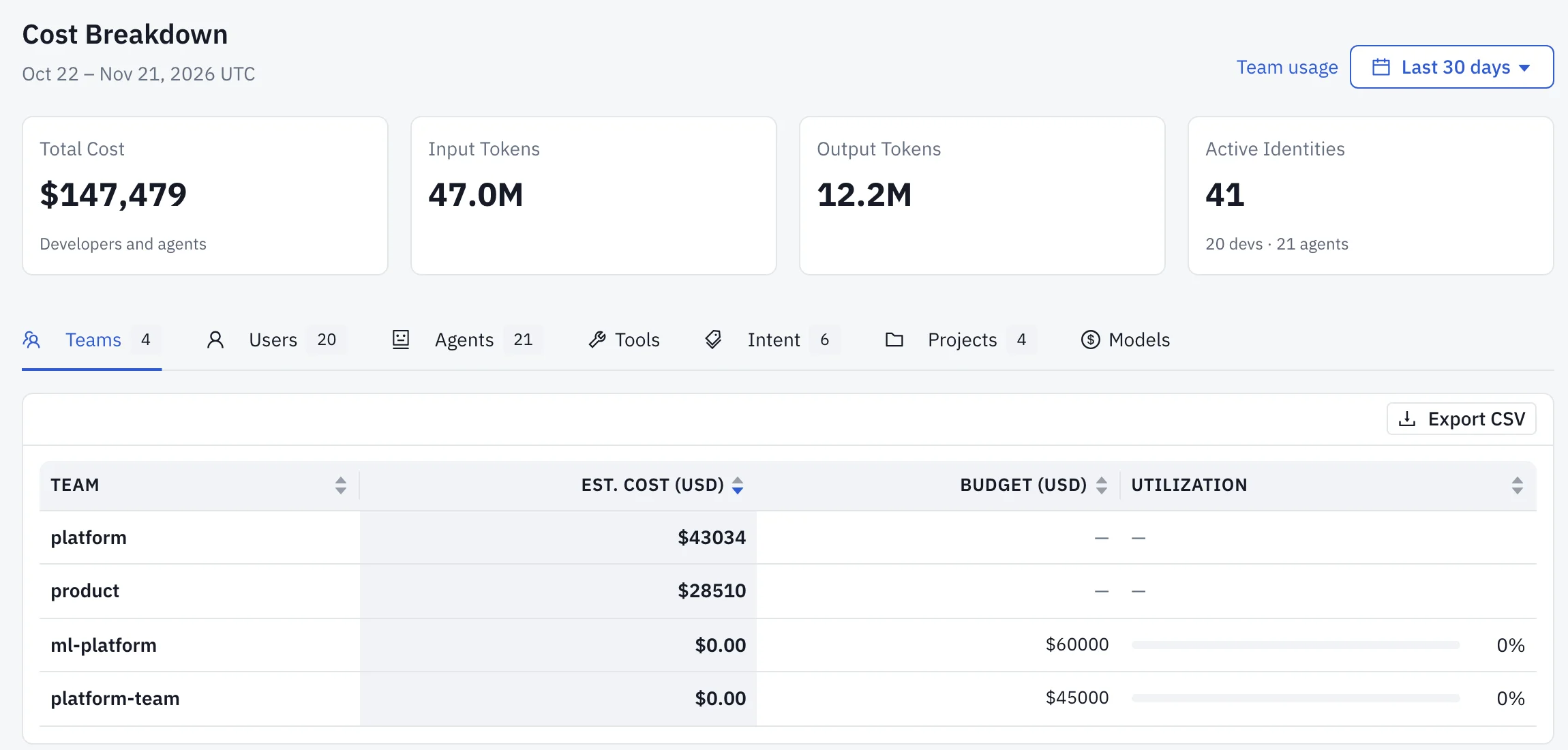
A gateway sees each request before it reaches a provider, so it can attach the caller’s identity, the model and the token counts to the same record. AIControls counts every priced LLM call through its proxy: calls a developer makes, agent calls a developer delegated, and calls an agent makes on its own with no developer behind it. Each call counts once. A delegated agent call appears under its developer and is not added again for the agent.
Bedrock and Vertex use their own model IDs, such as an inference-profile ID for Claude on Bedrock. AIControls attributes their cost to the canonical model name, so Bedrock traffic for a model rolls up with direct-provider traffic for the same model instead of appearing as extra rows.
What does AIControls record for each request?
Each priced call is stored with the same four-way token split, whatever the provider reports: uncached input tokens, cache-read tokens, cache-creation tokens and output tokens. OpenAI-format providers, including GitHub Copilot, report cached tokens inside their prompt total, so AIControls subtracts them before pricing. Anthropic, Gemini, Bedrock and the OpenAI Responses API are converted the same way. Each token is priced once.
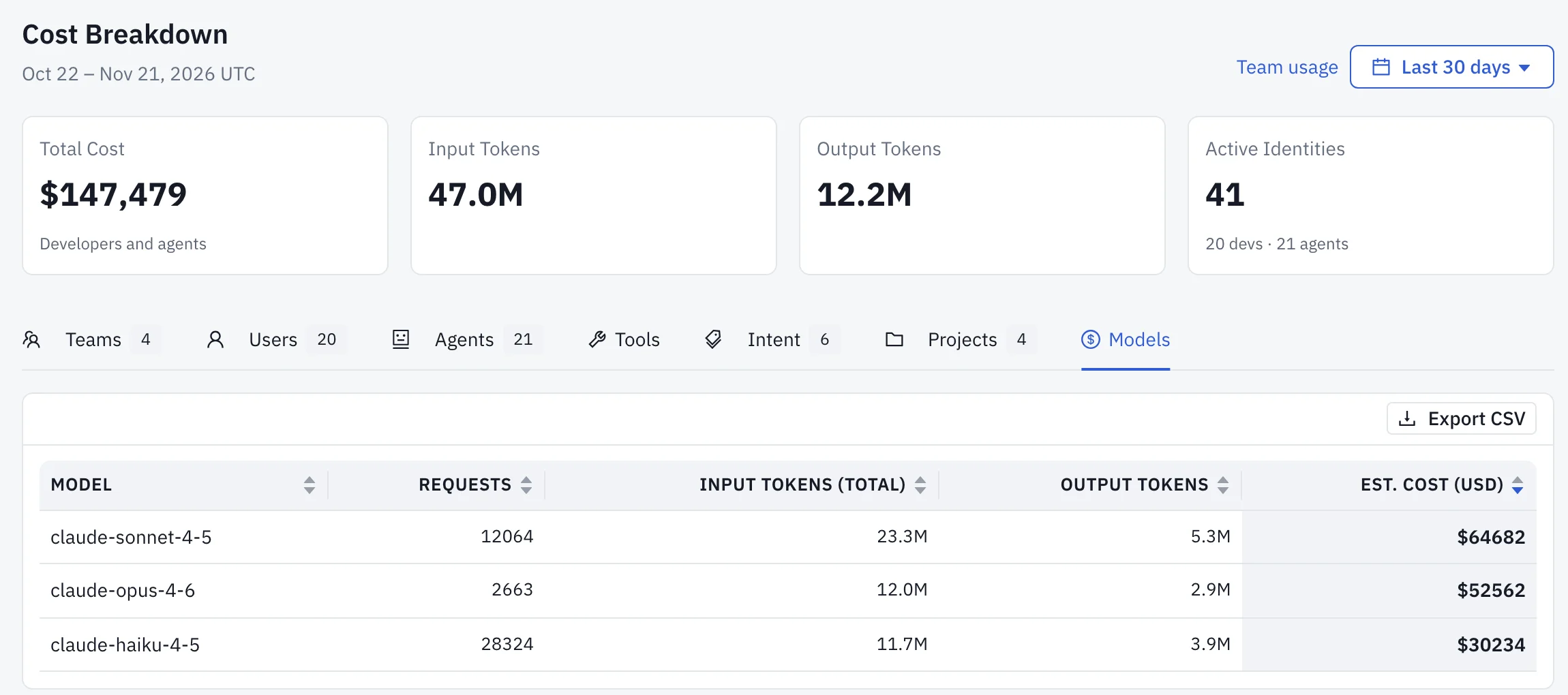
The estimated cost is the uncached input at the prompt rate, cache reads and cache writes at their own rates, and output at the completion rate. Each LLM request in the audit log carries its token count and estimated cost, and the Security → Activity → Gateway tab filters those events by identity, model and time range. JSON and CSV exports add provider, the provider that served the request, and pricingSource, which says where the price came from: vendor-table, cost-table, local or fallback.
That per-request record is what the dashboards add up. When a total looks wrong, you can open the requests behind it and read their prices and price sources directly.
Where do the dollar figures come from?
Every dollar figure on the Budgets and Cost Intelligence pages comes from a per-model cost table: prompt and completion price per 1M tokens, plus cache-read and cache-creation rates. AIControls ships default prices for common Anthropic, OpenAI, Google Gemini and Vertex, Fireworks AI and z.ai GLM models. A row you save always overrides the default, which is how you price at your own contracted rates.
Prices go stale as providers change them. Refresh on the model pricing page pulls current prices from the public pricing feeds once. Refresh prices automatically repeats that every 6 hours, 12 hours, day or week. It is off by default, and it never overwrites a price an admin set.
A model with no row is the gotcha. Its tokens are still tracked, but it is priced at a fallback rate of $30 per 1M prompt tokens and $180 per 1M completion tokens, chosen on the high side so an unpriced model cannot slip past a budget. Expect it to overstate cost until you add the real price. Settings → Model Costs warns when any model was priced at the fallback rate in the last 7 days.
Which breakdown answers which question?
The same per-request records feed several views. Pick the one that matches the question you are asking.
| Dimension | Question it answers | Where it appears in AIControls |
|---|---|---|
| Model | Which models carry the spend? | Model distribution on Cost → Cost Intelligence, one tile per model up to 10. Inventory → Models lists every model called through the proxy, with call count and total cost |
| Provider | How much goes to each vendor? | Model distribution groups models by provider when there are more than 10. Select a provider to list its models by spend |
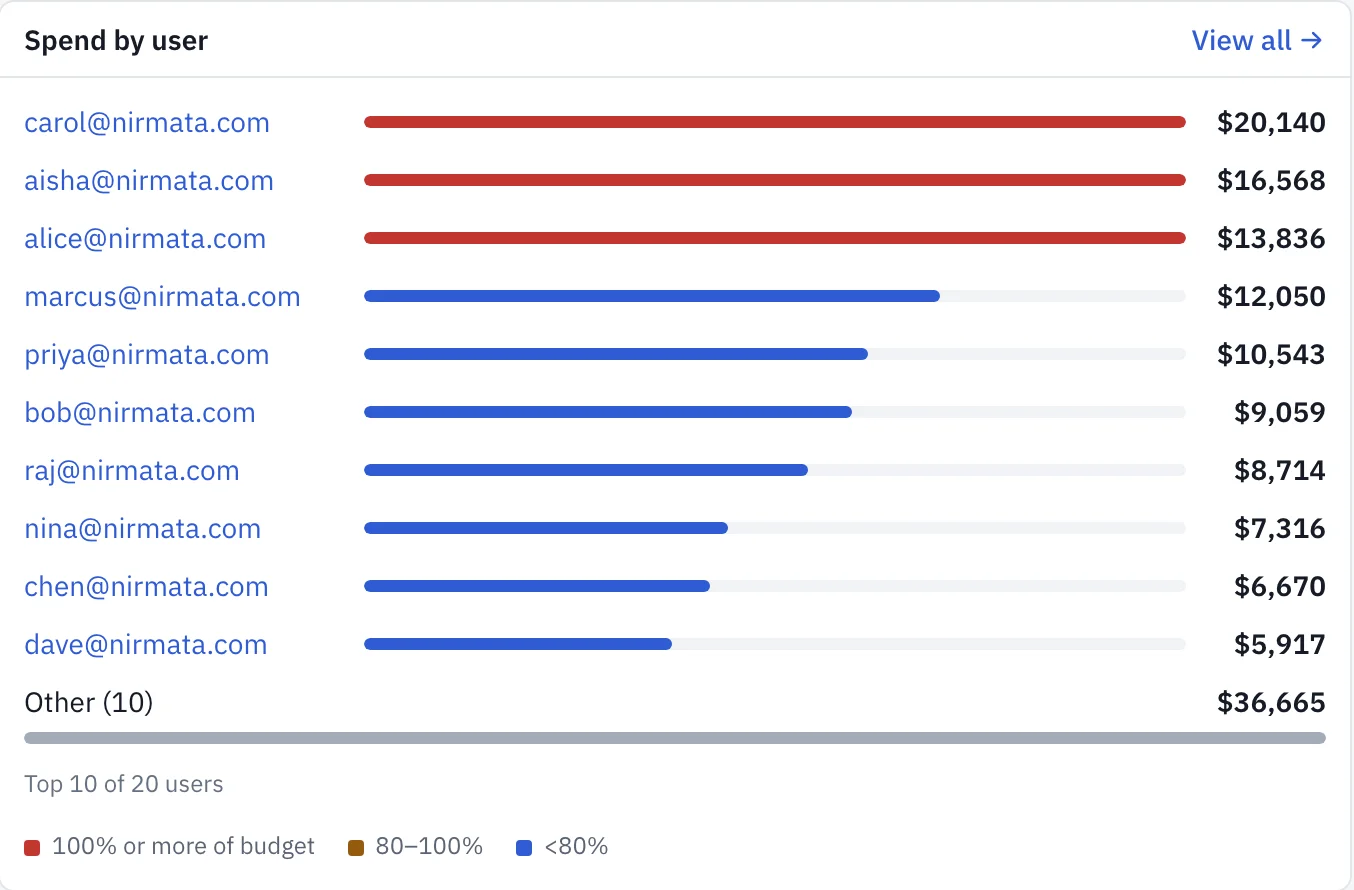
| Developer | Who are the largest spenders? | Spend by user on Cost Intelligence (top 10, then Other (N)), and Top Users on Home → Cost |
| Team | Which team owns this month’s spend? | The By team breakdown on the Cost → Budgets Overview, and the Teams view of the Cost Attribution diagram. Spend with no team shows as ungrouped |
| Project | Which repositories cost the most? | Top Projects on Home → Cost, and the Projects view of Productivity → Usage |
| Agent | What did an autonomous agent spend? | Calls an agent makes with no developer behind it count under the agent. A session’s Cost by agent table splits cost across the main agent and each subagent |
| Virtual key | How much has this agent credential used? | Each key’s spentUsd, the spend charged in its current budget period |
| Session | What did one task cost? | Identity → Sessions, with a cost breakdown of input, output, cache hits and estimated cost by model |
How to set up real-time cost monitoring in AIControls
- Add each provider your agents use under Settings → Providers. The supported providers reference lists Anthropic, OpenAI, Azure OpenAI, AWS Bedrock, Google Vertex and the catalog vendors.
- Point developer tools at the gateway. For Claude Code in proxy mode, AIControls holds the organization’s Anthropic key and each developer authenticates with a personal access token:
{
  "env": {
    "ANTHROPIC_BASE_URL": "https://YOUR_ORG.aicontrols.dev",
    "ANTHROPIC_AUTH_TOKEN": "YOUR_ACCESS_TOKEN"
  }
}- Give each developer their own token. The manual setup page warns that shared tokens make cost attribution and audit trails unreliable.
- Issue a virtual key to each agent that runs outside a developer’s session. A
virt_key carries a requiredagentId, an optionalallowedModelslist, and an optionalspendCapUsdwith adailyormonthlyperiod. - Open Settings → Model Costs. Add a row for each model in the fallback warning, set your contracted rates, and decide whether to turn on automatic refresh.
- Open Home → Cost and choose Last 24 hrs, Last 7 days or Last 30 days. Then open Cost → Cost Intelligence for attribution by user, team and model.
How current are the numbers?
Home → Cost refreshes itself about once a minute while the page is open, and the header shows the age of the oldest data on the page, for example Updated 38 s ago. The refresh button asks every card for new figures. The Identity → Sessions list refreshes every 10 seconds. A card that cannot compute a figure shows Unavailable rather than zero, so a slow query is not mistaken for a quiet day.
To feed your own dashboard, use the cost overview API. Its four GET endpoints return the overview, a spend series, the request rate and an activity heatmap. They accept only admin and viewer tokens, because the responses include email addresses and spend. Responses are cached for 45 seconds, and refresh=1 recomputes one, at most once every 10 seconds per response.
curl -s -H "Authorization: Bearer $TOKEN" \
  "https://aicontrols.example.com/api/v1/dashboards/cost/overview?from=2026-10-10T09:14:00Z&to=2026-10-11T09:14:00Z"
The window must be 24 hours, 7 days or 30 days, and to must be within 5 minutes of now. Send the token in the header. A request with a token query parameter is rejected with 400.
What the figures don’t cover
Three limits are worth stating before anyone uses these numbers for a decision.
The figures cover traffic through the gateway. A developer calling a provider directly with a personal key is invisible to them, which is why steps 2 to 4 above matter more than any dashboard setting.
They are estimates. Tokens multiplied by a price table is close to a bill only when the table holds your real rates, and the fallback rate overstates on purpose. Applying a corrected price to past requests updates Cost Intelligence and the cost dashboards, but budgets, session spend and virtual-key spend are not rewritten.
Attribution is only as good as identity. Cost Attribution leaves out anonymous callers, and a shared token puts several people’s spend under one name.
For allocating these totals to teams, see chargeback and showback for AI coding agents.
From monitoring to budgets
Once the numbers are trusted, budgets use the same per-request cost. A budget rule on Cost → Budgets → Rules matches a scope (Global, Team or User in the console, plus Agent and Token through the API) and a model glob such as claude-opus*, and caps USD spend over an hourly, daily, weekly or monthly window. At the limit it can deny, audit, warn or hold requests for approval. Warn at sends a budget_warning notification, 80% by default. A default session cap limits any single session, and a virtual key’s spendCapUsd stops that key for the rest of its period.
The plans page lists budget rules, virtual keys and sessions under the Team plan.
For the details, read how to cap AI coding agent spend per developer and how to set budget alerts for a runaway AI agent.
Try it on your own traffic
See the AIControls platform page for the full feature set, and the AIControls for coding agents page for how it fits Claude Code, Cursor and Copilot. To see your own spend broken down by model, team and key, download AIControls or request a demo.
Frequently asked questions
Does AIControls see AI spend that bypasses the gateway?
No. The spend totals count every priced LLM call through the AIControls proxy, including calls an agent makes on its own and calls a developer delegated to an agent. A developer or agent that calls a provider directly with its own key is not in those figures. Route every client through the gateway with workspace tokens or virtual keys before you treat the totals as complete.
Is the AIControls cost figure the same as my provider invoice?
Treat it as an estimate. Each figure is the request's token counts multiplied by the per-model price table in Settings, Model Costs. AIControls ships default prices for common Anthropic, OpenAI, Google, Fireworks AI and z.ai models, and a row you save overrides the default. Set rows to your contracted rates, then compare a month of totals against your provider's billing before you charge teams from them.
What happens to cost tracking when a new model has no price yet?
Its real token usage is still tracked, and each request is priced at a fallback rate of $30 per 1M prompt tokens and $180 per 1M completion tokens, so it is never shown as $0. The docs say this overstates the true cost on purpose. The model pricing page warns about fallback-priced models, and after you add a price you can apply it to past requests.
Which AIControls plan includes budgets and virtual keys?
The plans page lists budget rules, virtual keys and sessions under the Team plan. A plan without them refuses those actions with HTTP 402 and names the plan that includes them. Cleanup stays open on every plan, so you can still list and revoke virtual keys and delete a budget rule after a plan change. Check the plans and entitlements page for the current limits.