


Why is Kubernetes Authorization so Complex
Securing Kubernetes API access is complex. After a user is authenticated (verifying who they are), an application’s authorization workflow determines what specific actions and data that user is permitted to access by checking their credentials against a set of predefined access rules. This process typically involves a resource server validating an access token provided by the application before granting access to a protected resource.
Standard solutions across industries require sidecars, are costly, and do not scale well. This post describes a more straightforward solution: a centralized Kyverno Authorization Server that uses the new Kyverno CEL-based ValidatingPolicy with Istio service mesh. This solution eliminates sidecars, enhances policy consistency, and enables fine-grained, JWT-based authorization for all traffic.
The architecture reduces resources, offers instant policy updates, and centralizes audit trails, transforming authorization into a streamlined, centrally managed capability that cuts costs, ensures compliance, and simplifies operations.
What are the Challenges with OPA Sidecar Authorization in Kubernetes?
When using Istio OPA-based authorization in Kubernetes, it typically follows this pattern:
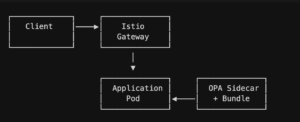
| Challenge | Description |
| Resource Multiplication | Every pod requires an additional OPA sidecar container, significantly increasing memory and CPU consumption. |
| Bundle Distribution | Rego policies must be compiled, packaged, and distributed using complex mechanisms like S3 or similar external storage. |
| Update Latency | Policy changes require a full bundle rebuild and often necessitate a time-consuming pod restart to take effect. |
| Consistency Risk | Different pods may run on different policy versions during deployment rollouts, risking inconsistent security enforcement. |
| Operational Overhead | Managing and maintaining N sidecars across hundreds of microservices adds substantial complexity to the platform team’s workload. |
Why Choose Centralized Kyverno for Sidecarless Authorization?
The Kyverno Authorization Server with Istio provides a superior, centralized alternative that directly addresses the challenges of sidecar-based authorization.
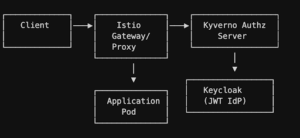
Advantages:
- Sidecarless: Authorization decisions happen at the Envoy proxy level via external auth
- Performance: CEL expression highly optimized for performance, critical for latency-sensitive applications whereas Rego can be less performant due to its power and expressiveness, better for non-latency-critical use cases
- Centralized policies: Kyverno ValidatingPolicy CRDs applied once, enforced everywhere
- Immediate updates: Policy changes take effect instantly—no pod restarts
- Consistent enforcement: Single source of truth for all authorization decisions
- Native Kubernetes: Policies are CRDs managed with kubectl and GitOps workflows
How Does Centralized JWT Authorization with Kyverno and Istio Work?
- Request Interception: When a request arrives at the Istio ingress gateway or sidecar proxy, Istio’s AuthorizationPolicy resource (with action: CUSTOM) intercepts it.
- External Authorization Call: The Envoy proxy makes a gRPC call to the Kyverno Authorization Server, passing request attributes (headers, path, method, etc.).
- Policy Evaluation: Kyverno evaluates the request against ValidatingPolicy CRDs, which can:
- Extract and validate JWT tokens from the Authorization header
- Verify token signatures using JWKS endpoints
- Check token expiry and custom claims
- Match requests by service, namespace, path, method, and headers
- Return allow/deny decisions with custom status codes
- Decision Enforcement: The proxy allows or denies the request based on Kyverno’s decision, without the application ever seeing unauthorized requests.
- Logging and Observability: All authorization decisions are logged centrally, providing clear audit trails.
Key Technologies for Kyverno-Istio Authorization
Kyverno (1.15+): A Kubernetes-native policy engine that uses CEL (Common Expression Language) for policy definitions. Focused initially on admission control, Kyverno now supports Envoy external authorization mode.
Istio: A service mesh that provides traffic management, security, and observability. The external authorization filter delegates auth decisions to external services.
Keycloak: An open-source identity and access management solution that issues standards-compliant JWT tokens. Can be replaced with any OIDC-compatible IdP (AWS Cognito, Auth0, etc.).
CEL: Common Expression Language—a non-Turing complete expression language designed for fast, safe evaluation in sandboxed environments, used by Kyverno for policy logic.
Prerequisites
Before proceeding, ensure you have the following:
Required Knowledge
- Kubernetes fundamentals: Understanding of pods, services, namespaces, and CRDs
- Service mesh concepts: Familiarity with Istio or similar mesh technologies
- JWT and OAuth2: Basic understanding of token-based authentication
- Policy-as-code: Exposure to declarative policy concepts
Required Tools
| Tool | Version | Purpose | Installation |
| Docker | 20.x+ | Container runtime | Install Docker |
| kubectl | 1.28+ | Kubernetes CLI | Install kubectl |
| Helm | 3.12+ | Package manager | Install Helm |
| Kind | 0.20+ | Local Kubernetes | Install Kind |
| curl | Any | HTTP client | Usually pre-installed |
| jq | 1.6+ | JSON processor | Install jq |
| Terraform (optional) | 1.5+ | Keycloak config | Install Terraform |
Environment Setup
Minimum resources for local development:
- 8GB RAM
- 4 CPU cores
- 20GB free disk space
Kubernetes cluster options:
- Local: Kind, Minikube, or Docker Desktop
- Cloud: EKS, GKE, AKS with Istio support
- On-premises: Any Kubernetes 1.28+ cluster
Step-by-Step Instructions
Step 1: Create Local Kubernetes Cluster
We’ll use Kind (Kubernetes in Docker) for a lightweight local cluster:
# Create cluster with specific Kubernetes version
kind create cluster –name authz-demo –image kindest/node:v1.34.0
# Verify cluster is running
kubectl cluster-info
kubectl get nodes
What this does: Creates a single-node Kubernetes cluster running in Docker. Kind is ideal for local development and testing without cloud costs.
Expected output:
Creating cluster “authz-demo” …
✓ Ensuring node image (kindest/node:v1.31.0) 🖼
✓ Preparing nodes 📦
✓ Writing configuration 📜
✓ Starting control-plane 🕹️
✓ Installing CNI 🔌
✓ Installing StorageClass 💾
Step 2: Deploy Keycloak Identity Provider
Keycloak will issue JWT tokens for testing. In production, use your existing IdP (AWS Cognito, Azure AD, Okta, etc.).
kubectl create ns keycloak
kubectl create -f https://raw.githubusercontent.com/keycloak/keycloak-quickstarts/refs/heads/main/kubernetes/keycloak.yaml -n keycloak
# By default the resource in the menifest is on higher side which can be edited according to the resource constraints
What this does: Deploys Keycloak with an embedded PostgreSQL database. Keycloak will issue OIDC-compliant JWT tokens that our policies will validate.
Access Keycloak (in a separate terminal):
# Port forward to access Keycloak locally
kubectl port-forward -n keycloak svc/keycloak 8080:8080
Navigate to http://localhost:8080 and log in with admin/admin.
Configure test realm and user (using Terraform or manually):
Apply the Terraform code present in GitHub.
# Option 1: Using Terraform (if keycloak.tf exists)
terraform init
terraform apply -auto-approve
# Option 2: Manual configuration via Keycloak Admin Console
# 1. Create realm: “demo-realm”
# 2. Create client: “demo-client” with client secret
# 3. Create user: “testuser” with password
# 4. Assign groups: “platform-admins”, “developers”
Step 3: Install Certificate Management
Kyverno requires TLS certificates for secure gRPC communication with Istio:
# Install cert-manager
helm install cert-manager \
–namespace cert-manager –create-namespace \
–wait \
–repo https://charts.jetstack.io cert-manager \
–set crds.enabled=true
Create self-signed certificate issuer (production should use Let’s Encrypt or internal CA):
kubectl apply -f – <<EOF
apiVersion: cert-manager.io/v1
kind: ClusterIssuer
metadata:
name: selfsigned-issuer
spec:
selfSigned: {}
EOF
What this does: cert-manager automates certificate lifecycle management. The ClusterIssuer creates self-signed certificates on demand for development purposes.
Step 4: Install Kyverno Authorization Server
# Install Kyverno ValidatingPolicy CRD
kubectl apply -f \
https://raw.githubusercontent.com/kyverno/kyverno/main/config/crds/policies.kyverno.io/policies.kyverno.io_validatingpolicies.yaml
# Install Kyverno Authorization Server
kubectl create ns kyverno
helm install kyverno-authz-server \
–namespace kyverno \
–wait \
–repo https://kyverno.github.io/kyverno-envoy-plugin kyverno-authz-server \
–values – <<EOF
certificates:
certManager:
issuerRef:
group: cert-manager.io
kind: ClusterIssuer
name: selfsigned-issuer
EOF
What this does:
- Installs the ValidatingPolicy CRD that defines authorization rules
- Deploys the Kyverno Authorization Server that evaluates policies
- Configures automatic TLS certificate generation
Verify installation:
kubectl get pods -n kyverno
kubectl get crd validatingpolicies.policies.kyverno.io
Expected: One running pod and the CRD installed.
Step 5: Install Istio Service Mesh
Install Istio with the Kyverno external authorization provider configured:
# Install Istio base components
helm install istio-base \
–namespace istio-system –create-namespace \
–wait \
–repo https://istio-release.storage.googleapis.com/charts base
# Install Istio control plane with Kyverno integration
helm install istiod \
–namespace istio-system \
–wait \
–repo https://istio-release.storage.googleapis.com/charts istiod \
–values – <<EOF
meshConfig:
extensionProviders:
– name: kyverno-authz-server
envoyExtAuthzGrpc:
service: kyverno-authz-server.kyverno.svc.cluster.local
port: 9081
EOF
What this does:
- Installs Istio’s control plane (istiod)
- Configures the kyverno-authz-server as an external authorization provider
- Enables Envoy proxies to delegate authorization decisions to Kyverno
Verify Istio installation:
kubectl get pods -n istio-system
You should see the istiod pod running.
Step 6: Deploy Test Application
We’ll use HTTPBin, a simple HTTP request/response service:
# Create namespace and enable Istio injection
kubectl create ns app
kubectl label namespace app istio-injection=enabled
# Deploy HTTPBin
kubectl apply -n app -f https://raw.githubusercontent.com/istio/istio/release-1.24/samples/httpbin/httpbin.yaml
# Verify deployment
kubectl get pods -n app
What this does: Creates a test application with an Istio sidecar automatically injected. The sidecar will intercept requests and consult Kyverno for authorization.
Expected output: You’ll see two containers in the HTTPBin pod—the application and the Istio proxy.
Step 7: Configure Authorization Policies
Now we’ll create the actual authorization rules.
Create Istio AuthorizationPolicy (instructs Istio to use Kyverno):
kubectl create -n app -f – <<EOF
apiVersion: security.istio.io/v1
kind: AuthorizationPolicy
metadata:
name: kyverno-authz
spec:
action: CUSTOM
provider:
name: kyverno-authz-server
rules:
– {} # Intercept all requests
EOF
What this does: Tells Istio to call the Kyverno Authorization Server for every request to services in the app namespace.
Create Kyverno ValidatingPolicy (defines authorization logic):
Apply kyverno validating-policy.yaml
kubectl apply -f – <<EOF
apiVersion: policies.kyverno.io/v1alpha1
kind: ValidatingPolicy
metadata:
name: jwt-validation
namespace: app
spec:
failurePolicy: Fail
evaluation:
mode: Envoy
variables:
# JWKS endpoint (adjust for your IdP)
– name: token_issuer
expression: string(‘http://keycloak.keycloak.svc.cluster.local:8080/realms/demo-realm/protocol/openid-connect/certs’)
# Fetch public keys for JWT validation
– name: certs
expression: jwks.Fetch(variables.token_issuer)
# Extract Authorization header
– name: authorization
expression: object.attributes.request.http.headers[?“authorization”].orValue(“”).split(” “)
# Parse and validate JWT token
– name: token
expression: >
size(variables.authorization) == 2 &&
variables.authorization[0].lowerAscii() == “bearer”
? jwt.Decode(variables.authorization[1], variables.certs)
: null
validations:
# Rule 1: Require valid JWT token
– expression: >
variables.token == null || !variables.token.Valid
? envoy.Denied(401).Response()
: null
# Rule 2: Block access to /get/* unless in admin group
– expression: >
object.attributes.request.http.path.startsWith(“/get“) &&
!(“platform-admins” in variables.token.Claims.groups)
? envoy.Denied(403).Response()
: null
EOF
What this does:
- Token extraction: Extracts the Bearer token from the Authorization header
- JWT validation: Validates token signature, issuer, and expiry using Keycloak’s JWKS endpoint
- Claim-based authorization: Checks group membership for sensitive paths
- Returns decisions: Returns 401 (Unauthorized) for missing/invalid tokens, 403 (Forbidden) for insufficient permissions
Policy breakdown:
variables:
– name: token_issuer # Where to get public keys
– name: certs # Downloaded certificates
– name: authorization # Parsed Authorization header
– name: token # Decoded JWT (or null)
validations:
– expression: > # First rule: valid token required
variables.token == null || !variables.token.Valid
? envoy.Denied(401).Response()
: null
If token is null (no token provided) or !token.Valid (expired/invalid), return 401.
Step 8: Test Authorization
Set up test environment:
# Create test pod
kubectl create ns test
kubectl run -i -t test-client –image=alpine –restart=Never -n test
# Inside the test pod, install tools
apk add curl jq
Get a JWT token from Keycloak:
# Set variables (adjust for your configuration)
ISSUER=“http://keycloak.keycloak.svc.cluster.local:8080/realms/master”
TOKEN_ENDPOINT=“$ISSUER/protocol/openid-connect/token”
# Get access token
ACCESS_TOKEN=$(curl -s -X POST $TOKEN_ENDPOINT \
-H “Content-Type: application/x-www-form-urlencoded” \
-d “grant_type=password” \
-d “client_id=kube” \
-d “client_secret=kube-client-secret” \
-d “username=user-dev” \
-d “password=user-dev” \
-d “scope=openid profile email” | jq -r ‘.access_token’)
echo $ACCESS_TOKEN
Test with a valid token (should succeed):
curl -i -H “Authorization: Bearer $ACCESS_TOKEN” \
http://httpbin.app:8000/get
Expected: HTTP 200 with response from HTTPBin.
Test without token (should fail with 401):
curl -i http://httpbin.app:8000/get
Expected: HTTP 401 Unauthorized.
Test admin endpoint without admin group (should fail with 403):
curl -i -H “Authorization: Bearer $ACCESS_TOKEN” \
http://httpbin.app:8000/get/users
Expected: HTTP 403 Forbidden (unless your user is in platform-admins group).
Inspect the token:
# Decode JWT (without validation)
echo $ACCESS_TOKEN | cut -d‘.‘ -f2 | base64 -d | jq
You’ll see claims like:
{
“sub”: “user-id”,
“groups”: [“kube-dev”],
“iss”: “http://keycloak.keycloak.svc.cluster.local:8080/realms/demo-realm”,
“exp”: 1234567890,
“iat”: 1234564290
}
Step 9: Advanced Policy Patterns
Path-based authorization:
validations:
# Allow GET for all authenticated users
– expression: >
object.attributes.request.http.method == “GET”
? envoy.Allowed().Response()
: null
# POST/PUT/DELETE require write permissions
– expression: >
object.attributes.request.http.method in [“POST”, “PUT”, “DELETE”] &&
!(“api-writers” in variables.token.Claims.groups)
? envoy.Denied(403).Response()
: null
Service-specific authorization:
validations:
# Only service accounts can call internal APIs
– expression: >
object.attributes.request.http.path.startsWith(“/internal/”) &&
!variables.token.Claims.client_id.startsWith(“service-“)
? envoy.Denied(403).Response()
: null
Time-based access:
validations:
# Check if token is about to expire (within 5 minutes)
– expression: >
variables.token.Claims.exp < timestamp(now).getSeconds() + 300
? envoy.Denied(401).WithMessage(“Token expiring soon”).Response()
: null
Custom headers in response:
validations:
– expression: >
variables.token.Valid
? envoy.Allowed()
.WithHeader(“X-Auth-User”, variables.token.Claims.sub)
.WithHeader(“X-Auth-Groups”, variables.token.Claims.groups.join(“,”))
.Response()
: envoy.Denied(401).Response()
Step 10: Production Hardening
Replace Keycloak with your production IdP:
Update the token_issuer in your ValidatingPolicy:
variables:
– name: token_issuer
# For AWS Cognito:
expression: string(‘https://cognito-idp.<region>.amazonaws.com/<user-pool-id>/.well-known/jwks.json’)
# For Azure AD:
# expression: string(‘https://login.microsoftonline.com/<tenant-id>/discovery/v2.0/keys’)
# For Auth0:
# expression: string(‘https://<your-domain>.auth0.com/.well-known/jwks.json’)
Enable TLS everywhere:
# Use real certificates in production
# cert-manager with Let’s Encrypt:
kubectl apply -f – <<EOF
apiVersion: cert-manager.io/v1
kind: ClusterIssuer
metadata:
name: letsencrypt-prod
spec:
acme:
server: https://acme-v02.api.letsencrypt.org/directory
email: your-email@example.com
privateKeySecretRef:
name: letsencrypt-prod
solvers:
– http01:
ingress:
class: istio
EOF
Add resource limits:
# For Kyverno Authorization Server
resources:
requests:
memory: “256Mi”
cpu: “200m”
limits:
memory: “512Mi”
cpu: “500m”
Configure high availability:
# Scale Kyverno Authorization Server
kubectl scale deployment kyverno-authz-server -n kyverno –replicas=3
# Enable pod disruption budget
kubectl apply -f – <<EOF
apiVersion: policy/v1
kind: PodDisruptionBudget
metadata:
name: kyverno-authz-server
namespace: kyverno
spec:
minAvailable: 2
selector:
matchLabels:
app.kubernetes.io/name: kyverno-authz-server
EOF
Centralized logging:
# View authorization decisions
kubectl logs -n kyverno deployment/kyverno-authz-server -f
# Sample log entry
{
“level”: “info”,
“ts”: “2025-10-13T10:15:30Z”,
“caller”: “server/server.go:123”,
“msg”: “authorization decision”,
“decision”: “deny”,
“reason”: “invalid_token”,
“path”: “/api/users”,
“method”: “GET”,
“user”: “unknown”,
“status_code”: 401
}
The Future of Kubernetes Authorization is Centralized
Centralized authorization with Kyverno and Istio fundamentally transforms how you secure Kubernetes workloads. By eliminating per-pod OPA sidecars, you reduce operational complexity, cut significant cloud costs, and gain immediate policy consistency across your entire mesh. The architecture we’ve built here—JWT validation via JWKS, claim-based authorization, and fine-grained access control—applies to both north-south ingress traffic and east-west service communication, without requiring changes to the application code.
The business impact is clear: lower infrastructure spend, faster policy rollouts, simplified compliance, and reduced operational burden. Whether you’re securing a handful of microservices or hundreds, this centralized approach scales effortlessly while preserving your existing investments in identity infrastructure.
Ready to implement this in your environment? Start with a single namespace or service group to validate performance and policy coverage. Integrate with your existing IdP (AWS Cognito, Azure AD, Okta), manage policies via GitOps, and measure the resource savings. As confidence grows, expand incrementally, retiring sidecars and enjoying the operational simplicity of centralized authorization.
Next Steps and Resources
- Explore the code: The complete example is available at https://github.com/nirmata/demo-kyverno-authz-server.
- Read more about Kyverno: kyverno.io/docs
- Learn Istio security: istio.io/docs/concepts/security
- Platform engineering best practices: Explore how policy-as-code accelerates DevSecOps workflows at scale
The future of Kubernetes authorization is centralized, declarative, and mesh-native. Start building it today.


