

OpenShell on Kubernetes: A Guide for Platform Engineers
What OpenShell is
AI agents do more than call APIs. They run shells, install packages, read files, and open network connections. Often they act on text they pulled from the internet a minute earlier. So every agent is untrusted code that holds real credentials.
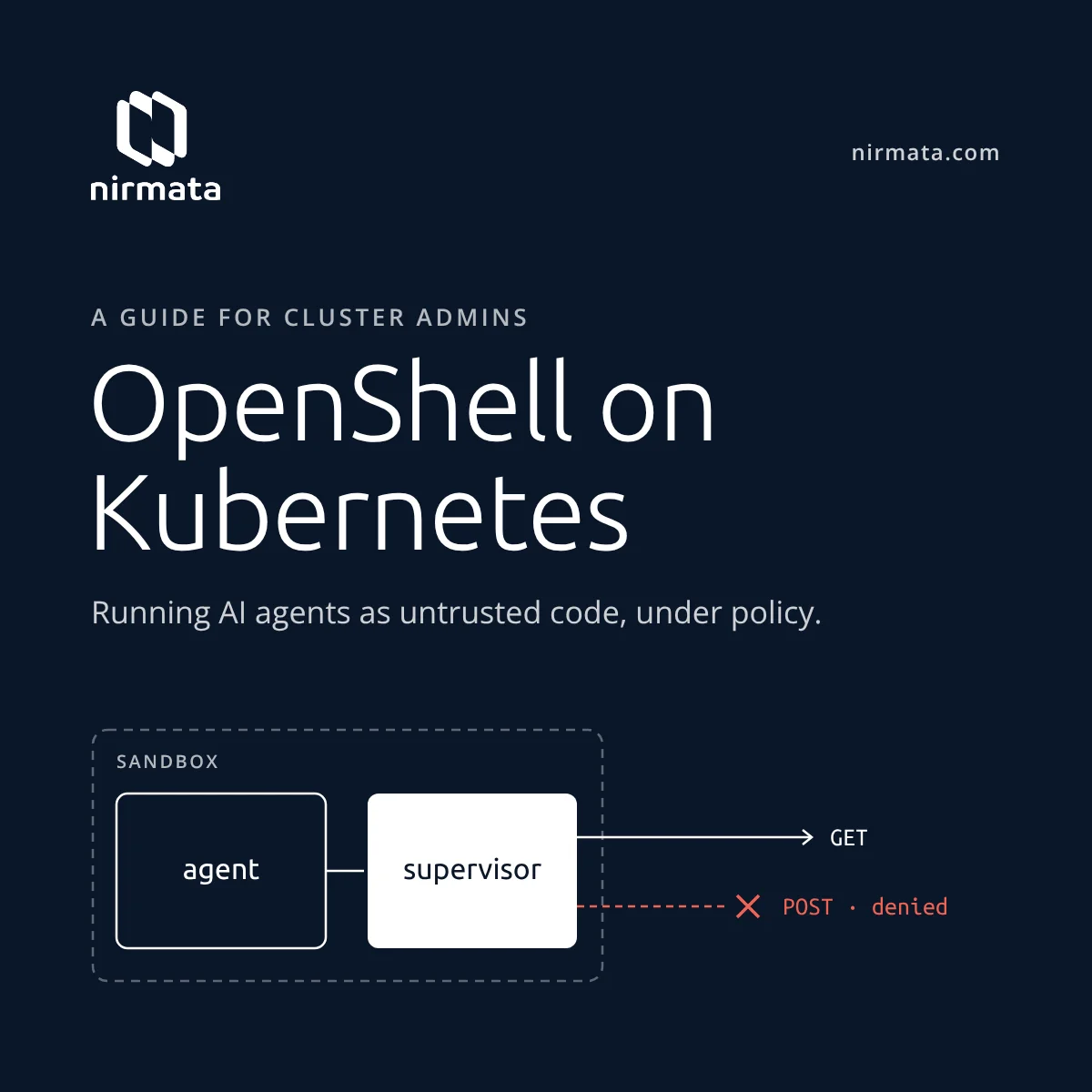
OpenShell, started by NVIDIA and now a CNCF Sandbox project, is a runtime for running agents like this safely. OpenShell runs each agent in a sandbox. A trusted supervisor outside the sandbox decides what the agent may reach. You declare four kinds of control in YAML:
- Filesystem: Landlock limits which paths the agent can read or write. In the demo, /usr, /etc, and a few other paths are read-only, and only /sandbox, /tmp, and /dev/null are writable.
- Process: before the agent starts, the sandbox runtime drops it to a non-root user with no capabilities and applies seccomp.
- Network: outbound traffic is denied by default. Rules can allow traffic per binary, host, port, and HTTP method.
- Credentials: the agent sees only a placeholder for each API key. The supervisor swaps in the real key, and only for endpoints the provider allows.
For Kubernetes admins, a key point is that OpenShell does not bring its own scheduler. Its Kubernetes backend uses Agent Sandbox, the agents.x-k8s.io Sandbox resource from SIG Apps. Agents show up as Pods, Services, PVCs, Secrets, and NetworkPolicies, which you already know how to run. OpenShell adds what Kubernetes can’t see: which agent is calling, which binary made the request, and whether a given POST may leave the cluster.
A NetworkPolicy can say “this Pod may reach api.github.com on 443.” It cannot say “curl may read issues but not create them.” OpenShell can, and it can change that rule on a running sandbox without a restart.
How a sandbox is created and run
On Kubernetes, the OpenShell gateway owns every sandbox, and Agent Sandbox turns each one into Pods. The nirmata/demo-openshell repo runs the whole flow on a two-node kind cluster with Kubernetes 1.35, Cilium 1.20, Agent Sandbox v1.0.5, OpenShell 0.1.3, and Kyverno 1.18.2. Its openshell-sandbox-lifecycle.md file describes each step in detail.
Note: Currently, OpenShell sandboxes can only be created by calling the Gateway API and not via the Kubernetes API. There is an open issue (openshell/#1719) for a Kubernetes OpenShellSandbox CRD, and an operator.
Note 2: a Supervisor Pod per agent provides strong isolation, but may not scale well in large environments. The roadmap includes flexible deployment options (see RFC 0018, openshell/#4311).
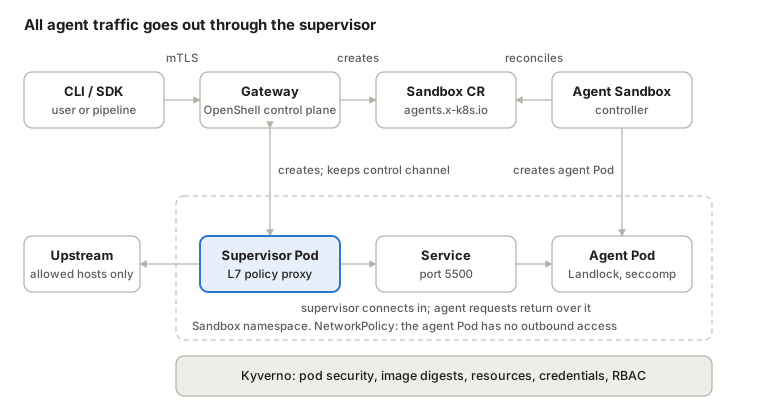
OpenShell on Kubernetes · control path and data path
The gateway creates the Kubernetes objects, and Agent Sandbox creates the agent Pod. The agent Pod has no outbound network access of its own. The supervisor opens the only connection to it, and every request the agent makes goes back over that connection for a policy check. Kyverno checks the Kubernetes objects at admission.
- Prepare the cluster. Install a CNI that enforces both ingress and egress NetworkPolicy. The demo replaces kindnet with Cilium. Then install the Agent Sandbox controller and CRDs, and then the OpenShell gateway Helm chart.
- Create a sandbox. openshell sandbox create –workspace demo –name policy-demo –from nicolaka/netshoot@sha256:… –no-auto-providers sends the request to the gateway over mTLS. Clients never talk to the Kubernetes API. A workspace, here demo, groups sandboxes, policy, and logs.
- The gateway checks and records the request. It authenticates the caller, resolves the image, policy, providers, and resources, and rejects unsafe settings. It then saves a sandbox record in the Provisioning phase. This record, not the Pod, is the source of truth.
- Network policies come first. The Kubernetes driver creates two NetworkPolicies in the namespace, or checks them if they already exist. One covers workload Pods: no outbound traffic at all, and inbound traffic only from supervisors on TCP 5500. The other covers supervisor Pods. Only then does the driver create the Sandbox resource, in a suspended state.
- Agent Sandbox creates the workload. The controller creates the workload Pod and a PVC for /sandbox. A scheduling gate holds the Pod back.
- OpenShell checks the admitted Pod. After admission, the driver reads the Pod back. It checks for a non-root UID and GID, no added capabilities, RuntimeDefault seccomp, no host namespaces, no ServiceAccount token, and the expected labels and volumes. If an admission webhook changed any of these, creation fails.
- The supervisor is created. The driver creates a supervisor Pod, a Service in front of the workload Pod’s port 5500, TLS and bootstrap Secrets for this sandbox, and a short-lived token for the supervisor. The workload never gets gateway credentials. Then the scheduling gates come off.
- The supervisor connects. The supervisor authenticates to the gateway with an identity tied to the namespace, the Sandbox UID, its own Pod UID, and the runtime generation. It receives the policy and connects to the workload through the Service. Inside the workload, the sandbox runtime applies the filesystem, process, socket, and DNS controls. The agent’s command does not start until these controls are confirmed.
- Run and update. Each outbound request from the agent goes to the supervisor, which checks the destination, port, calling binary, and HTTP request before it opens the upstream connection. Exec, SSH, logs, and file sync also go through the supervisor. openshell policy update loads a new policy version and waits for the sandbox to confirm it, without a restart. In the demo, curl starts out blocked. After the update it can be read from api.github.com, but a POST to /issues returns policy_denied. openshell logs policy-demo –source sandbox shows each allowed and denied request.
- Stop, start, and delete. Stopping suspends the Sandbox and removes the workload Pod, but keeps the PVC. Starting creates a new runtime generation and runs the Pod checks again. Deleting removes the Sandbox, and owner references clean up its Pods, Service, Secrets, and PVC. The two namespace NetworkPolicies stay. If creation fails partway, the driver rolls back.
OpenShell checks only the Pod settings it needs to stay safe. Which images run, how big a sandbox can get, which credentials it gets, and who can change OpenShell’s RBAC are left to the platform team.
OpenShell vs. Agent Substrate
Agent Substrate is another CNCF project that provides sandboxed execution for agents. Both projects applied, and were accepted, to the CNCF Sandbox in September, 2026 (#522 and #523). Both run each agent in its own sandbox on Kubernetes, but they are built differently. OpenShell uses the SIG Apps Agent Sandbox project. Substrate has its own scheduler, controller, and sandbox runtime.
Lin Sun’s CNCF post, Why sandboxing your agent is not enough, makes the case for Substrate: “Sandboxing your agents is necessary, but not sufficient.” Agent Sandbox is about running agents securely. Substrate is about running them securely and cheaply at scale, by suspending idle agents instead of giving each one a Pod.
Agent Substrate is not meant to be used directly, but requires an orchestration layer like Agent Executor, Kagent, or possibly in the future OpenShell (more on that below).
| OpenShell | Agent Substrate | |
|---|---|---|
| Origin | NVIDIA | |
| CNCF Sandbox | Voted in Sep 26, 2026 | Voted in Sep 28, 2026 |
| Main problem | What may this agent do? | How do we run thousands of mostly idle agents cheaply? |
| Unit of work | One sandbox per agent: a Sandbox, a workload Pod, and a supervisor Pod | An actor: an identity plus a snapshot. When active, it runs in its own sandbox inside a shared worker Pod. Workers are designed to hold many actors (–max-actors defaults to 1,000), but the autoscaling demo notes that each worker holds one actor today |
| Kubernetes building block | Agent Sandbox. The gateway creates agents.x-k8s.io Sandbox resources, and the Agent Sandbox controller reconciles them | Its own WorkerPool CRD (ate.dev), which atecontroller turns into a Deployment of worker Pods. It does not use Agent Sandbox |
| Routing | Through the gateway and the sandbox’s supervisor | An ate-target-actor header. The router resumes the actor if needed, and atunnel passes the request to its sandbox. Actors have no Pod IP |
| Credentials | The supervisor swaps a placeholder for the real key, only at endpoints the provider allows | The egress gateway swaps an ate-secret:// placeholder header for the real credential. Actors and snapshots never hold the secret |
| Identity | Supervisor identity tied to the namespace, Sandbox UID, Pod UID, and runtime generation | A SPIFFE X.509 certificate per actor, valid for 1 hour, and mTLS between all components. OpenFGA access policies are in progress |
| State | A /sandbox PVC that survives stop and start | RAM and filesystem snapshots in object storage. Suspend and resume take under a second; the goal is 100 ms at p95 |
| Autoscaling | HPA for the gateway (more than one replica needs external PostgreSQL) and node autoscalers. Sandbox has no /scale subresource, so HPA, KEDA, and VPA cannot target a sandbox. Each new agent is a gateway API call | WorkerPool has a /scale subresource, so HPA can scale workers on how full they are (the demo runs on kind only), plus node autoscalers. Requests wait when the pool is full |
| Maturity | v0.1.x | Pre-1.0. |
Three areas that will matter most for cluster admins:
- How detailed the policy is. OpenShell checks each request at a supervisor that serves one sandbox. It can let curl read GitHub issues and block curl from creating one. Substrate checks traffic at a shared egress gateway, per actor and per destination host. Each rule inspects HTTPS, passes TLS through by SNI, or denies. There is work underway to natively support OpenFGA policies and allow external policy.
- What Kubernetes can see. Each OpenShell sandbox is a set of Kubernetes objects, so RBAC, Kyverno, audit logs, and kubectl work on it. Substrate keeps actors, templates, and egress policies in its own API, backed by PostgreSQL, so the Kubernetes API server is not on the request path. Admission control sees Substrate’s worker pools, but not the agents or their egress policies.
- Isolation. Substrate requires a gVisor or Cloud Hypervisor sandbox for every actor; a plain container is not supported. That is what makes its snapshots possible. OpenShell runs a standard container with Landlock and seccomp, and you can require a stronger RuntimeClass for untrusted agents.
Scaling follows from this. With OpenShell, your application decides how many sandboxes to run, and you size each one when you create it, as the demo does with Kyverno defaults and caps. With Substrate, HPA scales the worker pools, and the number of agents is separate from the number of Pods.
For now, choose based on your workload. If you have a large volume of bursty, mostly idle agents, such as one assistant per user, and cost per agent matters most, look at Substrate. If your agents hold real credentials and reach production systems, and you need per-request control and policy on Kubernetes objects, look at OpenShell.
Many large enterprises will likely need a mix, and in the future, you may be able to use both. OpenShell’s RFC 0012, merged Sep 10, 2026, makes isolation a pluggable isolation backend, separate from the supervisor that enforces policy. The team has proposed building a Substrate backend (NVIDIA/OpenShell#3362). OpenShell would keep the policy, credential, and audit controls, and Substrate would add gVisor isolation and suspend and resume that keeps memory.
One blocker is fixed. #3366, merged Sep 21, means the shared contract no longer requires Landlock or seccomp evidence, so a gVisor backend can supply its own. Two pieces are still open: a versioned transport for a backend that runs in a separate process, and a lifecycle operation that keeps memory. As of Oct 11 the issue is open. A contributor has +1’d it and asked whether the maintainers would accept it, but no maintainer has replied yet.
If it is accepted, you would get OpenShell’s per-request policy with Substrate’s density. Until then, the difference for admins is where policy runs. With OpenShell, Kyverno checks the sandboxes themselves. With Substrate, Kyverno checks the worker pools, and per-agent policy is set in Substrate’s own API.
What Kyverno adds
Kubernetes settings decide the sandbox Pod’s image, privileges, resources, credentials, and network rules. OpenShell checks some of these itself (step 6 above). RBAC and Kyverno, or other Kubernetes policy engines, help cover the rest.
Start with RBAC. If only the gateway’s ServiceAccount and the Agent Sandbox controller can create Sandbox resources, other users cannot go around the gateway. Cluster-admins still can. RBAC decides who can use which verb on which resource type. It does not look at what a request contains, and it cannot add defaults. So these questions remain:
- Which images may agents run?
- How large can a sandbox get?
- Can an agent receive a raw API key?
- Can someone add wildcard permissions to an OpenShell Role, or open up the workload NetworkPolicy?
Kyverno checks these at admission, for every user and ServiceAccount that sends requests to the sandbox namespace, including cluster-admins and the gateway. The demo’s kyverno-demo.sh runs six checks that RBAC cannot do. Then it creates a sandbox through OpenShell that passes all of them:
| Control | Attempt | Kyverno policy | Result |
|---|---|---|---|
| Pod security | A Sandbox with a privileged: true container | enforce-sandbox-pod-security | Denied: “Every sandbox container must run as non-root, drop all capabilities, and disable privilege escalation.” |
| RBAC | A Role named openshell-* that grants * verbs on * resources | restrict-openshell-rbac | Denied: “OpenShell RBAC rules may not contain wildcards.” |
| Network | A patch that lets the openshell-sandbox-workloads NetworkPolicy allow all egress | verify-openshell-network-boundary | Denied: “…may not allow direct workload egress.” |
| Supply chain | A Sandbox that uses the tag nicolaka/netshoot:v0.13 | enforce-sandbox-image-hygiene | Denied: “Sandbox images must use immutable sha256 digest references.” |
| Resources | A Sandbox with no resources set, then one that asks for 8 CPU and 16Gi of memory | default-sandbox-resources, enforce-sandbox-resource-bounds | The first gets defaults (100m CPU request). The second is denied: “at most 4 CPU, 8Gi memory, and 20Gi ephemeral storage” |
| Credentials | A Sandbox that loads a Kubernetes Secret with envFrom | protect-sandbox-credentials | Denied: “Use OpenShell providers instead of injecting Kubernetes Secrets…” |
A sandbox created through OpenShell with a digest-pinned image is admitted and keeps the 100m CPU request that Kyverno added. All seven policies run in Enforce mode. Six are ValidatingPolicy resources and one is a MutatingPolicy, all written in CEL. They match Sandbox resources, Roles and ClusterRoles named openshell-*, and the openshell-sandbox-workloads NetworkPolicy.
The policies check the request, not the sender, so they also apply to the gateway. Even a compromised gateway cannot push a privileged, unpinned, or oversized Sandbox through admission. However, the gateway’s ServiceAccount can still create Pods and NetworkPolicies directly in the sandbox namespace. For production, extend the policies to Pods and to any NetworkPolicy that selects OpenShell workloads.
The demo leaves out four more kinds of policy, because each needs signing keys or other setup first:
- Image verification: require Cosign signatures, SBOM and provenance attestations, and vulnerability checks for the gateway, supervisor, runtime, and agent images.
- Runtime class: require a RuntimeClass such as gVisor or Kata for untrusted agents.
- Workspace budgets: cap the number of sandboxes, their lifetime, and GPUs per workspace.
- Cleanup: delete idle sandboxes with Kyverno cleanup policies, and skip any under legal hold.
Admission control only sees agents that OpenShell creates. A team’s own Deployment that calls api.openai.com never goes through the gateway or a supervisor. For that case, Nirmata’s Runtime for Kyverno, or other kernel monitors, run as a DaemonSet and attach eBPF programs to the Pods that a RuntimePolicy selects. It watches exec, file open, network, and DNS activity. In monitor mode it reports AI tools that nobody approved: agent CLIs such as claude or ollama, stdio MCP servers, *.gguf model files, and DNS lookups for model-provider hostnames. It writes findings as OpenReports in the Pod’s namespace.
Future integrations can bring Kyverno policies to the OpenShell Supervisor for fine-grained control of sandbox operation allow and deny decisions.
Closing thoughts
Agents, and applications that talk to LLMs, are becoming a primary workload on Kubernetes. Admins will be asked to run them like everything else: isolated, audited, and under policy. OpenShell builds on Agent Sandbox instead of going around it, and it adds per-binary, per-request controls that Kubernetes objects cannot express.
OpenShell checks the Pod settings it depends on and leaves the rest to you. This separation-of-concerns plays nicely with the CNCF ecosystem. The rest are Kubernetes objects, and admission control handles those well. Use RBAC to control who can create sandboxes. Use Kyverno to control what those sandboxes may contain, starting with the seven policies in the demo. OpenShell controls the agent, and Kyverno controls the rest.
To try it yourself:
git clone https://github.com/nirmata/demo-openshell
cd demo-openshell
./scripts/setup.sh && ./scripts/install-cli.sh && ./scripts/verify.sh
./scripts/demo.sh           # OpenShell L7 policy
./scripts/kyverno-demo.sh   # Kyverno admission policies
./scripts/cleanup.sh
You need Docker, kind, kubectl, Helm, curl, SSH, and nc. Then try the policies on your own OpenShell cluster and tell us what breaks.
Sources
- OpenShell architecture and Kubernetes setup
- OpenShell 0.1.0 upgrade notes (removal of inference.local)
- CNCF project page: OpenShell, Sandbox application #522, onboarding issue #535
- CNCF project page: Agent Substrate, Sandbox application and vote result #523
- agent-substrate/substrate on GitHub and its WorkerPool autoscaling demo
- About Agent Substrate (GKE docs)
- Why sandboxing your agent is not enough (Lin Sun, CNCF Ambassador post, July 7, 2026)
- OpenShell RFC 0012: Isolation Backend interface (#2048), Agent Substrate as a delegated isolation backend (#3362), backend-neutral confirmation (#3366)
- Agent Sandbox
- Runtime for Kyverno (Nirmata)
- nirmata/demo-openshell