

Kubernetes For Developers Part 2 – Replica Sets and Deployments
Updated Deen Aariff
A ReplicaSet keeps a specified number of identical pod replicas running at any given time. A Deployment manages ReplicaSets for you and adds a declarative way to update both the ReplicaSet and its pods, including rolling updates, which a ReplicaSet can’t perform on its own. In practice, you create Deployments and let them manage the ReplicaSets.
Where this post fits in the series
In the previous blog post in our Kubernetes For Developers Series, we discussed what Kubernetes Pods are and the unique functionality they offer.
We started the series with Pods because they are the basic building blocks of Kubernetes. Understanding Pods introduces developers to the “Kubernetes way” of orchestrating containerized workloads, and it makes the larger architecture, including the abstractions that surround Pods, less blurry.
Pods alone don’t give us nearly enough to build reliable applications and services that communicate with one another. The most basic problem is that Pods are unreliable by nature. A singleton Kubernetes Pod is highly susceptible to being preempted or rescheduled on a different node, so we need some additional resource to keep track of the changing IP address of our pod. That matters even more when we scale instances of a pod to increase the availability and fault tolerance of our application.
What this post covers
Two resources solve this problem: Workload API Objects and Services. A Workload API Object is a type of Kubernetes API Object meant to orchestrate multi-pod workloads. This post covers one of them, the Deployment, and the resource that Deployments manage: the Replica Set. Services get their own entry next.
By the end, you should understand what Replica Sets are and how Deployments extend their functionality.
As with every entry in our “Kubernetes for Developers Series”, we will end this post with a video showing how these concepts are used in the Nirmata platform, so you get both the concepts and a way to put them into action with Nirmata.
Table Of Contents
Click on one of the links below to be taken to any of our other entries in this series:
Part 2: Replica Sets and Deployments
ReplicaSet vs Deployment at a glance
Both objects run a set of identical pods from a pod template and use a label selector to decide which pods they own. The difference is what happens when you want to change those pods. The table sums up what the rest of this post explains in detail.
| ReplicaSet | Deployment | |
|---|---|---|
| Job | Ensures “that a specified number of pod replicas are running at any given time” | Encapsulates ReplicaSets and pods and provides a declarative method of updating the state of both |
| Required fields | apiVersion, kind, metadata, spec.template |
apiVersion, kind, metadata, plus spec.replicas, spec.selector and spec.template in the example below |
| Scaling | spec.replicas |
kubectl scale deployment (uses the existing ReplicaSet) |
| Pod selection | spec.selector matches pod labels, including pods it did not create |
selector.matchLabels matches the pods in its template |
| Rolling update | No | Yes |
| How you use it | Rarely used on its own | The resource most Kubernetes users interact with today |
If you only need to remember one thing: the Deployment is the object you write, and the ReplicaSet is the object it creates to do the scaling.
What is a ReplicaSet?
In the previous post, we mentioned that a key advantage of Pods is that they let developers group sets of containers as an application unit and start orchestrating them as workloads. Once a pod’s template exists, instances of the pod can be scaled horizontally to make a developer’s multi-container applications more highly available. To manage that scaling, Kubernetes uses an API object called a ReplicaSet.
According to the Kubernetes Documentation, Replica Sets ensure “that a specified number of pod replicas are running at any given time.” The documentation also points out that ReplicaSets are the “next-generation Replication Controller”. Replication Controllers help put Replica Sets in context, but this section sticks to the Replica Set.
A ReplicaSet is a type of Kubernetes API Object. Like any other member of this family, it requires values for the fields apiVersion, kind and metadata to uniquely identify a type of API object across Kubernetes versions.
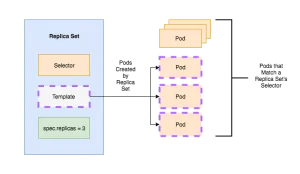
A ReplicaSet also needs one more field: spec.template, a template for a Kubernetes Pod without the apiVersion and kind, which are already present in the ReplicaSet. The Replica Set uses this template to create the pods it manages. Below is an example of a spec.template for a Replica Set.
metadata:
   name: myapp-pod
   labels:
      app: myapp
spec:
   containers:
   - name: myapp-container
     image: busybox
     command: ['sh', '-c', 'echo Hello Kubernetes! && sleep 3600']
How spec.replicas and spec.selector work
To change the number of instances a ReplicaSet manages, update the spec.replicas field. It sets how many Pods should run concurrently. The field does not guarantee that exactly the number of pods in .spec.replicas will be running at any given time. The Kubernetes documentation gives examples in which the number of pods “running at any time may be higher or lower, such as if the replicas were just increased or decreased, or if a pod is gracefully shut down, and a replacement starts early.”
A ReplicaSet can also have a .spec.selector field, which it uses to decide which pods to manage. Every pod whose labels match the spec.selector of a given ReplicaSet falls under that ReplicaSet’s control. This means a ReplicaSet can manage Pods that it did not explicitly create.
In practice, ReplicaSets are rarely used on their own to manage pods. The popular choice is a layer of encapsulation that uses ReplicaSets underneath: a Workload API object. The one we focus on here is the Deployment.
So, why do we need Deployments?
The need for Deployments comes more from the transition from Replication Controllers to Replica Sets than from anything Replica Sets lack. To see why, remember that Replication Controllers were the original resource used for scaling Kubernetes Pods.
One of the key features of Replication Controllers was “rolling-update”. It lets the pods managed by a Replication Controller be updated with minimal or no outage of the service those pods provide. To do this, the instances of the old pods are updated one by one.
Replication Controllers were criticized for being imperative and inflexible, though. Replica Sets and Deployments were introduced to replace them.
Replica Sets can still manage pods and scale the instances of a pod, but they can’t perform a rolling update, among other features. That functionality belongs to the Deployment, which is the resource a Kubernetes user today will most likely interact with.
How do Deployments work?
Deployments encapsulate replica sets and pods in the Kubernetes resource hierarchy and provide a declarative method of updating the state of both. One way to reach this declarative interface is kubectl. This isn’t a kubectl tutorial for Deployments, but we use kubectl commands below to show how a Deployment updates the state of its replica sets and pods.
Like ReplicaSets, Deployments are Kubernetes API Objects and require apiVersion, kind and metadata. The Kubernetes Documentation provides an example nginx-deployment.yaml that shows the basic functionality of Deployments well:
apiVersion: apps/v1
kind: Deployment
metadata:
  name: nginx-deployment
  labels:
     app: nginx
spec:
  replicas: 3
  selector:
    matchLabels:
      app: nginx
  template:
    metadata:
      labels:
        app: nginx
    spec:
      containers:
      - name: nginx
        image: nginx:1.7.9
        ports:
        - containerPort: 80
Notice how the Deployment specifies 3 replica sets of the nginx pod to be available. To do this, it creates a replica set with all the information needed to scale our nginx pod to 3 instances. It then provides a declarative interface for us to manage this replica set and pod.
This Deployment is named “nginx deployment”. Its selector, which matches the label “app : nginx”, determines which pods in the cluster the deployment manages. Here it only references the pod “nginx” defined in the Deployment’s pod template, the same idea as the pod template in a Replica Set from the previous section.
Scaling a Deployment declaratively
The image below visualizes what we’ve described about Deployments so far.
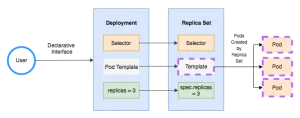
The declarative interface in the image is how a user changes the “state” of a deployment. Whether you use kubectl or another method, the Deployment checks whether the current state matches the state you asked for. If they don’t match, it works to make them consistent. You can see this when you use kubectl to update the number of replicas the Deployment manages:
kubectl scale deployment nginx-deployment --replicas=10
deployment "nginx-deployment" scaled
This command makes the deployment use the existing replica set to scale the number of pods to 10 instances. We won’t list every capability of Deployments here, but they offer a lot of flexibility for scaling pods declaratively.
To learn more about Deployments and what they offer, see the Kubernetes Documentation for Deployments. Next in the series: Part 3: Services. To split a cluster between teams, see Kubernetes Namespaces, and to check Deployments against policy as code, see Kyverno.
Video
Coming soon.
Frequently asked questions
Can I edit a ReplicaSet that a Deployment created?
You can, but you shouldn't. The Kubernetes documentation says not to manage ReplicaSets owned by a Deployment. The Deployment controller keeps reconciling its ReplicaSets toward the Deployment's spec, so manual changes such as a different replica count get overwritten. Make the change on the Deployment instead, with kubectl scale, kubectl set image or by applying an updated manifest.
What happens to the old ReplicaSet when I update a Deployment?
When you change a Deployment's pod template, for example the container image, the Deployment creates a new ReplicaSet and scales it up while scaling the old one down. The old ReplicaSet is kept with zero replicas so you can roll back. The .spec.revisionHistoryLimit field controls how many old ReplicaSets are retained; it defaults to 10.
How do I roll back a Deployment?
Run kubectl rollout history deployment/nginx-deployment to see the recorded revisions, then kubectl rollout undo deployment/nginx-deployment to return to the previous one. Add --to-revision=N to pick a specific revision. The rollback works because the Deployment kept the older ReplicaSet, so Kubernetes scales that ReplicaSet back up and scales the current one down.
When should I use a ReplicaSet directly instead of a Deployment?
Rarely. The Kubernetes documentation recommends Deployments over direct ReplicaSets unless you need custom update orchestration or don't need updates at all. A bare ReplicaSet will keep the replica count right, but changing its pod template doesn't replace pods that are already running, so you'd have to roll out new versions yourself.